
Why Do Streaming Microphones Use a Cardioid Polar Pattern?

If you’ve been shopping for a streaming microphone, you’ve probably noticed a pattern — literally. Almost every mic marketed to streamers, gamers, and podcasters uses a cardioid polar pattern. That’s not a coincidence or a marketing trend. Cardioid pickup is engineered to solve the exact problems creators deal with every day: keyboard clatter, PC fan hum, and the echo of an untreated bedroom.
How does a cardioid polar pattern work? Why is it the best polar pattern for streaming? And when to choose another pickup pattern? Let’s discuss in this guide.
What Is a Cardioid Polar Pattern?
A polar pattern describes the space around a microphone where it’s most sensitive to sound. A cardioid microphone picks up sound best from directly in front, hears less from the sides, and rejects most of what’s behind it. Plot that sensitivity on a graph and you get a heart-like shape — which is where the name “cardioid” comes from.
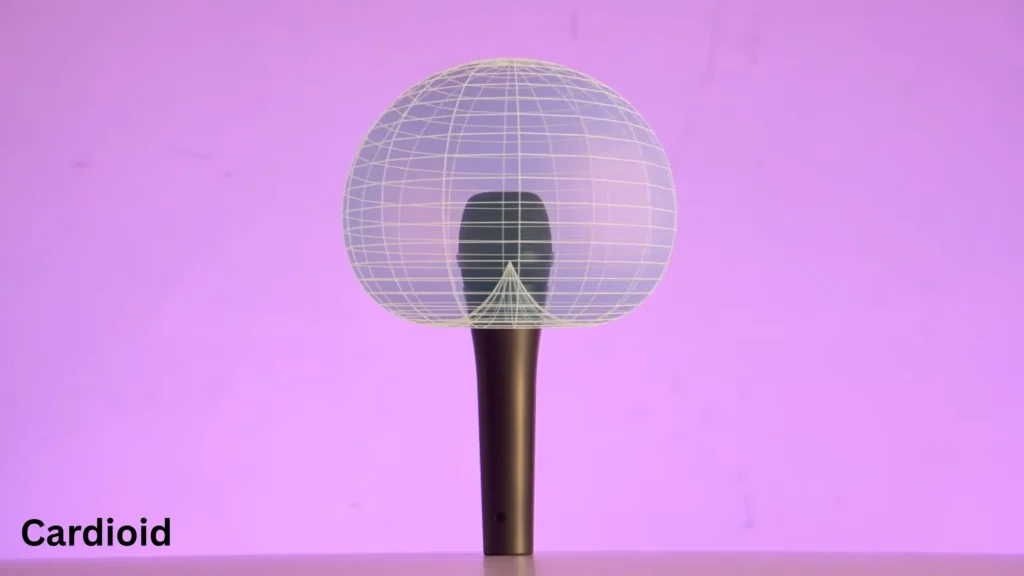
Think of it as a bubble of sensitivity sitting in front of the mic. Talk inside the bubble and you come through loud and clear. Sounds outside it — especially anything behind the microphone — get pushed into the background.
Microphone polar patterns decide where your mic picks up your sound. Other polar patterns, including figure-8 and supercardioid patterns, will work differently from the cardioid pattern. It’s this little difference make cardioid microphones work best for streaming.
Why Are Cardioid Microphones Ideal for Streaming?
Here’s why cardioid has become the default choice for streaming, gaming, and podcasting.
It Focuses on Your Voice
When you stream, your voice is the product. A cardioid microphone for streaming prioritizes whatever is on-axis — directly in front of the capsule — so your voice arrives at full sensitivity while off-axis sounds come through quieter and duller. The result is speech that sounds present and clear without you having to shout over your own room.
It Reduces Background Noise
Your desk is a noise factory. Mechanical keyboard, mouse clicks, PC fans, maybe an air conditioner rattling away in the corner. A cardioid pattern won’t make any of that disappear, but it rejects sounds arriving from outside its main pickup area — especially from the rear.
Creator @Nu-trix switched from an omnidirectional lavalier to a cardioid mic for exactly this reason: his omni mic picked up his computer’s fan and his kids playing on the other side of the door so clearly that he had to redo takes. With a cardioid mic aimed at his mouth, those sounds dropped far enough into the background that they stopped ruining recordings.
To be clear: cardioid rejection is relative, not absolute. A loud noise directly in front of the mic still gets captured. But for the constant, low-level noise floor of a home setup, the difference is dramatic.
It Works Better in Untreated Rooms
Most streamers broadcast from bedrooms and spare rooms, not acoustically treated studios. Every hard surface — walls, desk, monitor — bounces your voice back at the microphone as reflections, which is what makes recordings sound echoey and distant.
A cardioid mic improves the ratio between direct sound (your voice traveling straight into the capsule) and reflected sound (your voice bouncing off the walls first). Since most reflections arrive from off-axis directions, the mic naturally turns them down. Move the mic closer to your mouth and that ratio improves even further, which is why cardioid is the go-to pattern for recording in less-than-perfect rooms.
It’s Easier for Beginners
There’s no technique to learn. Point the front of the mic at your mouth, stay roughly in one spot, and you’re done. No wrestling with room ambiance, no figuring out which sides of the mic are live. For someone setting up their first stream, that simplicity matters as much as the sound.
How Should You Position a Cardioid Microphone?
Positioning a cardioid mic is simple, but three habits for your microphone placement make a real difference.
Speak into the front. This sounds obvious until you realize the “front” isn’t always where you’d expect. On side-address condenser mics — the kind that stand upright — the front is the flat side with the logo or badge, often marked with an indicator light. The mic faces sideways, not up. Talking into the top of a side-address mic is one of the most common beginner mistakes, and it makes an expensive microphone sound cheap.
Keep a consistent distance. Directional microphones exhibit the proximity effect: the closer you get, the more the low frequencies build up. A little of it adds that warm radio-DJ fullness. Too much, and your voice turns muddy — and if you drift closer and farther as you talk, your tone changes constantly. Pick a distance and hold it.
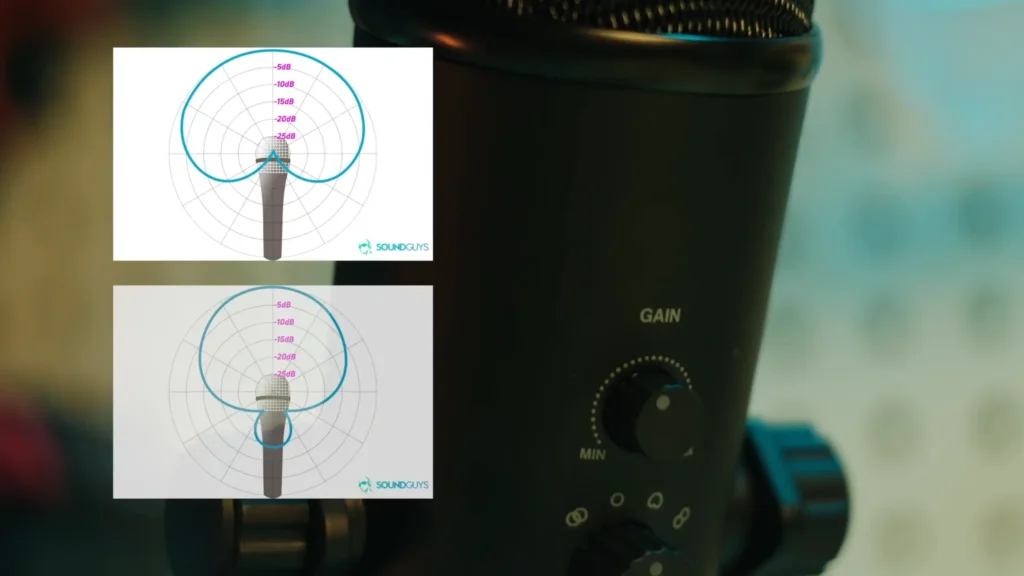
Aim the rear at the noise. Every cardioid mic has a null — the dead zone behind the capsule where rejection is strongest. Use it deliberately. If your PC tower hums on the left side of your desk, angle the back of the mic toward it. If a fan runs in the corner and you can’t switch it off while recording, point the null at the fan and let the mic do the noise reduction for you.
Are There Situations Where Cardioid Isn’t the Best Choice?
Yes — cardioid is a specialist, not a universal answer. A few scenarios where another pattern wins:
- Recording a group discussion. An omnidirectional mic picks up sound evenly from every direction, so one mic in the middle of a table captures everyone. A cardioid mic would favor whoever sits in front of it and muffle everyone else.
- Face-to-face interviews. A bidirectional (figure-8) mic picks up from the front and rear while rejecting the sides — ideal for two people sitting across from each other with one microphone between them.
- Ambient and room recording. If you want the sound of the space — the natural reverb of a nice-sounding room, street ambiance, a live audience — omnidirectional captures it faithfully. Omni mics also resist wind noise, plosives, and handling noise better than directional mics, and they don’t suffer from the proximity effect at all.
None of this changes the recommendation for streaming. It just means the “best” polar pattern always depends on what you’re recording.
Cardioid vs. Other Polar Patterns
| Polar Pattern | Best For |
|---|---|
| Cardioid | Streaming, gaming, podcasting |
| Omnidirectional | Meetings, group recordings, room ambiance |
| Bidirectional (figure-8) | Two-person interviews |
| Supercardioid | Live performances, extra noise rejection |
Supercardioid deserves one extra note: it narrows the pickup area even further than cardioid, which is why it shows up in live sound and shotgun mics that need to reject noise arriving at odd angles. The trade-off is a small rear pickup lobe and less forgiveness if you drift off-axis.
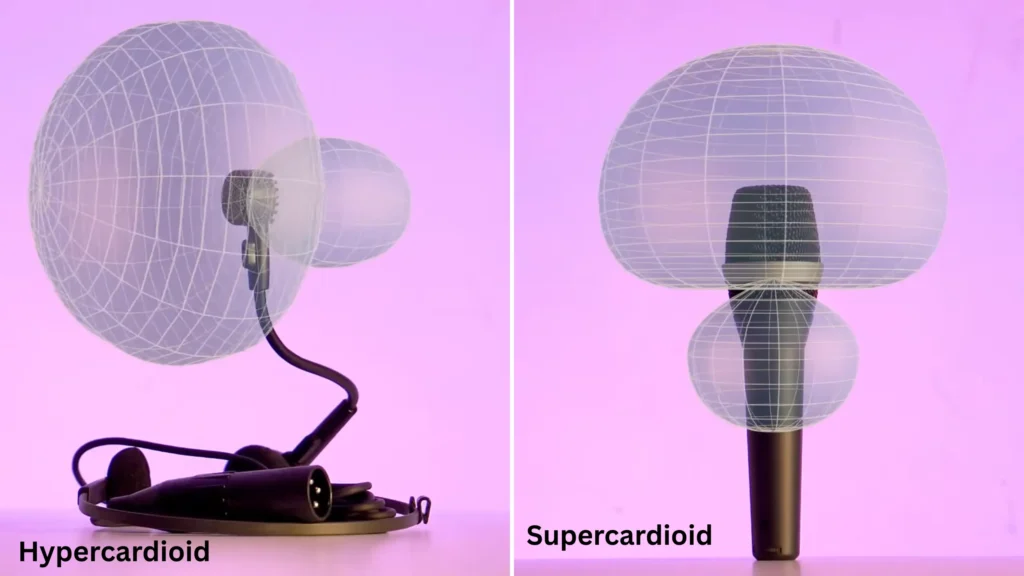
Want the full breakdown of how each pattern behaves, including how engineers combine patterns to create new ones? Our complete guide to microphone polar patterns goes deep.
How to Get the Best Results from a Cardioid Microphone
Owning a cardioid mic is half the job. These habits do the rest:
- Speak into the correct side. Front of the capsule, on-axis. Check for the badge or indicator light if you’re not sure.
- Keep the microphone close. Four to eight inches is a solid starting range. Closer means a stronger direct signal relative to room reflections — just watch for the proximity effect and plosives.
- Set your gain properly. Cranking the microphone gain to compensate for a distant mic also amplifies every noise in the room. Get the mic close first, then set gain so your voice peaks comfortably without clipping.
- Use a boom arm. The best microphone boom arm holds the mic at the right spot without cluttering your desk — and it decouples the mic from desk vibrations like typing thumps.
- Put noisy devices behind the mic. Your PC, air conditioner, and anything else that hums belongs in the null zone. Rearranging your desk is free noise reduction.
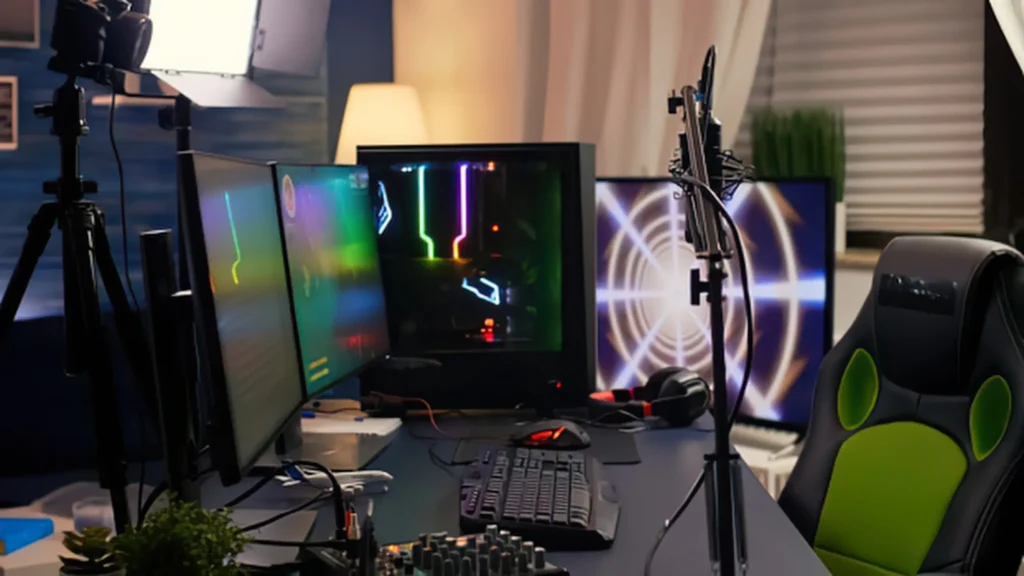
Recommended Streaming Microphones with Cardioid Pickup Patterns
Every microphone below uses a cardioid pattern — the differences come down to how you’ll use it.
- For beginners: A plug-and-play USB cardioid mic like the fifine K669B microphone gets you streaming in minutes — one cable, a gain knob, and no interface required.
- For streamers: The fifine AmpliGame AM8 microphone adds features built around live broadcasting: tap-to-mute, headphone monitoring, and RGB that matches a stream setup, all on a cardioid capsule tuned for voice.
- For gamers: If your mic shares a desk with a mechanical keyboard, a dynamic cardioid mic such as the fifine K688 microphone is the stricter option — dynamic capsules are less sensitive than condensers, so they pick up even less off-axis noise.
- For podcasters: The fifine K6 XLR handheld dynamic microphone gives you room to grow into an audio interface and proper gain staging, with the broadcast-style sound podcast listeners expect.
We’ve reviewed each of these in depth — check the individual reviews for sound samples and full specs before you buy.
Final Verdict
Why did a cardioid polar pattern become the streaming standard? That’s because it matches how creators actually work: one voice, one imperfect room, and a desk full of noise sources. It keeps your voice front and center and rejects what’s behind the mic. Other patterns have their place- omni for groups and figure-8 for interviews- but for streamers, gamers, and podcasters, cardioid remains the most practical choice by a wide margin.
FAQ
Is a cardioid microphone good for gaming?
Yes — it’s the best pattern for most gaming setups. It focuses on your voice and pushes keyboard, mouse, and fan noise into the background, especially anything behind the mic.
Does a cardioid microphone block keyboard noise?
It reduces it rather than blocking it. Rejection is strongest behind the mic, so position your keyboard off-axis and keep the mic close to your mouth so you can run lower gain.
Can a cardioid microphone pick up people behind it?
Faintly, yes. The rear null rejects most of the sound, but a loud voice directly behind the mic will still bleed through at reduced volume — quieter and duller than your own voice.
Is cardioid better than omnidirectional?
For streaming, yes. For recording a group around a table or capturing the sound of a room, omnidirectional wins. Neither pattern is better in the abstract — they solve different problems.
Should I speak directly into a cardioid microphone?
Yes, into the front of the capsule. Staying on-axis gives you the clearest, fullest sound; drifting off-axis makes your voice quieter and thinner.
