
Noise Gate vs. Expander: Which One Actually Fixes Your Mic Noise?

How to remove microphone background noise? Usually, a little adjustment on the noise gate or expander will solve it. They sit next to each other in almost every audio plugin menu, they share nearly identical settings, and plenty of tutorials use the names interchangeably.
Here’s a thing: pick the wrong one, and you trade one problem for another. A gate set too aggressively makes your microphone cut out mid-sentence. An expander set too gently leaves your keyboard clicks right where they were. So, how to use it correctly? This is what we’re discussing.
Quick Verdict
| Noise Gate | Expander | |
|---|---|---|
| What it does | Fully mutes audio below a set threshold | Reduces audio below a threshold by a ratio |
| Sound between words | Total silence | Quieter, but still present |
| Best for | Noisy rooms, constant hums, and fan noise | Multi-mic setups, podcasts, natural-sounding voice |
| Biggest risk | Cutting off soft speech or word endings | Not removing enough noise |
| Key settings | Threshold, attack, hold, release | Threshold, ratio, attack, release |
What Is a Noise Gate?
A noise gate is exactly what it sounds like: a gate that opens to let sound into your recording and closes to keep it out. When your voice crosses the threshold you’ve set, the gate opens, and your mic passes audio normally. When you stop talking, and the level drops below that threshold, the gate slams shut and the output goes silent.
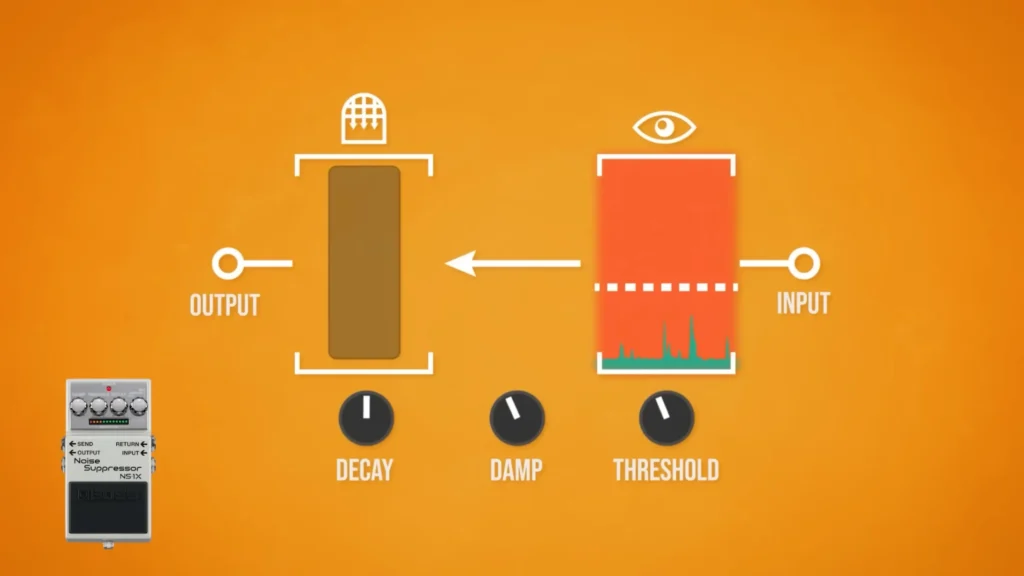
If you want to start your voice-over, a noise gate can make editing less labor-intensive. The gate handles every breath of room tone and chair creak automatically. For streaming in OBS Studio, the noise gate can kill computer fan hum, keyboard clicks, and distant household voices during live broadcasts.
Pros:
- Delivers true silence between phrases and clean voice tracks
- Cuts editing time dramatically — no more manually silencing gaps
- Built into free software like OBS Studio and Adobe Audition’s Dynamics processing
Cons:
- A poorly set threshold makes your mic cut out on soft words or trailing sentence endings
- Room reflections can bounce back and re-trigger the gate, creating an echo-like artifact
- The on/off behavior can sound unnatural
Key settings: threshold (the level where the gate reacts), attack (how fast it opens), hold (how long it stays open after you go quiet), and release (how fast it closes).
What Is an Expander?
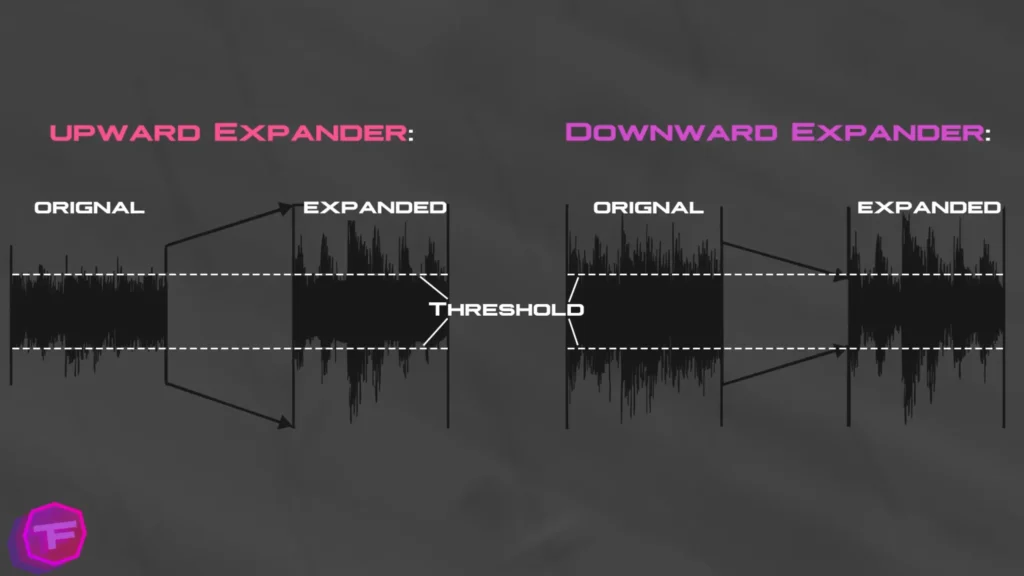
An expander is the inverse of a compressor. Where a compressor takes loud sounds and pulls them closer to a threshold, a downward expander takes sounds that fall below the threshold and pushes them further down. Your voice stays untouched, while room tone, mouth noise, and bleed from other sources get quieter.
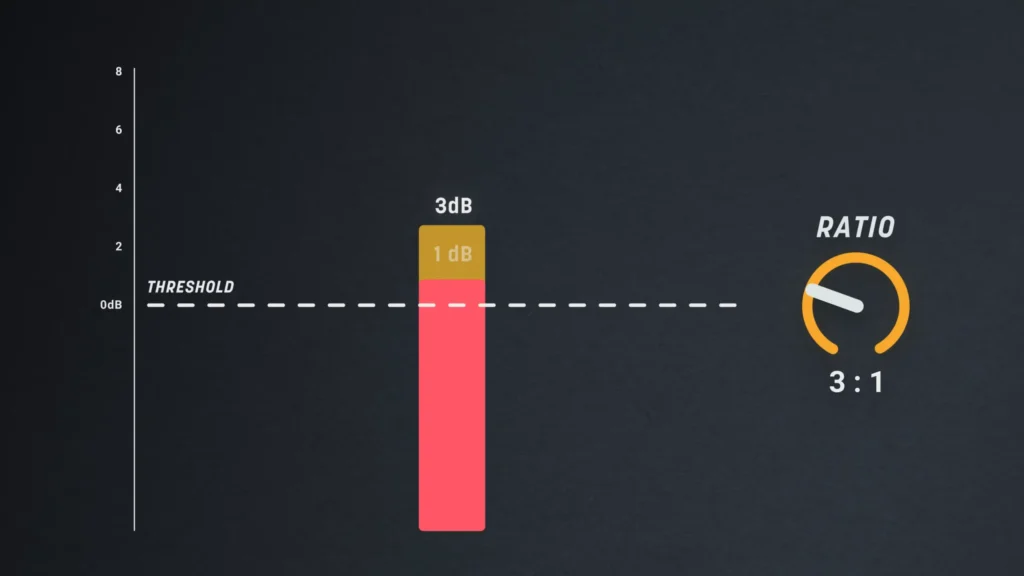
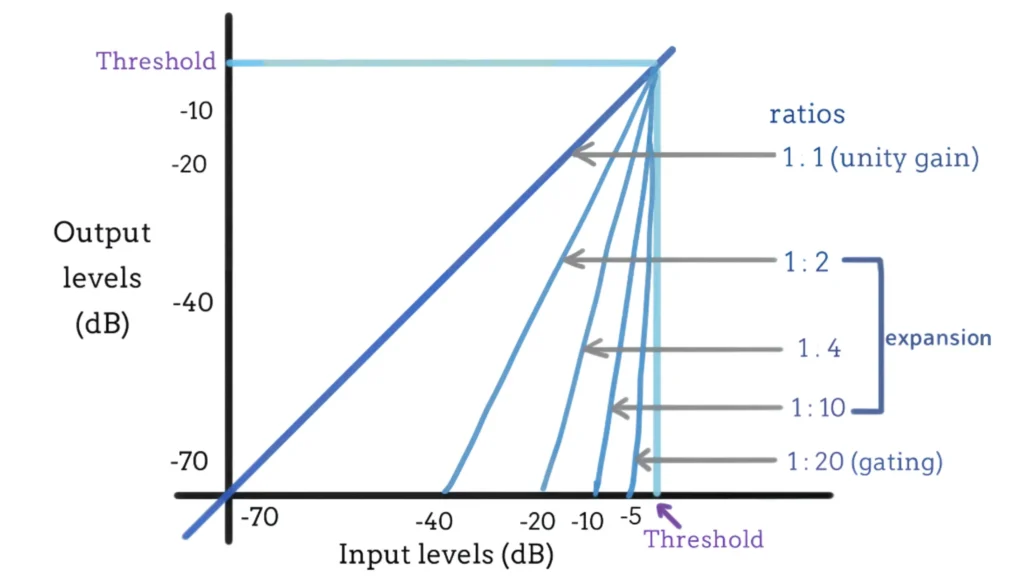
The ratio controls how hard the expander pushes. With a 3:1 ratio, every decibel a signal drops below the threshold gets turned down by an additional three decibels. One decibel under becomes three down, two becomes six, and so on. The further below the threshold a sound sits, the more it shrinks.
Worth knowing: most expanders in mixing tools like iZotope‘s Neutron and Nectar are upward expanders. They amplify signals above the threshold, adding dynamic life to flat performances. For noise control on a microphone, though, the downward expander is the one you want.
Pros:
- Sounds more natural because the audio never fully cuts off
- Better for soft talkers and off-axis speech
- Reduces mic bleed in two-person podcast setups without gate artifacts
- Less post-production fiddling to balance multiple microphone levels
Cons:
- Loud, constant background noise will still sneak through at a lower level
- The ratio adds one more setting to understand and tune
- Slightly less common in beginner streaming tools
Key settings: threshold, ratio, attack, and release. Attack and release work the same way they do on a compressor — they control how quickly the expander reacts and how quickly it lets go.
Noise Gate vs. Expander: Key Differences
Before we dig into each dimension, here’s the side-by-side view:
| Dimension | Noise Gate | Expander |
|---|---|---|
| Response to quiet audio | Mutes it completely | Reduces it by a ratio (e.g., 3:1) |
| Response curve | Hard cutoff — on or off | Gradual slope below the threshold |
| Sound character | Clean but can feel abrupt | Smooth and natural |
| Soft talkers and off-axis speech | Risk of missed words | Still audible, just quieter |
| Multi-mic bleed | Echo-like artifacts when re-triggered | Reduced smoothly, no pumping |
| Post-production workload | Low in quiet rooms, high if it misbehaves | Consistently low |
| Typical settings | Threshold, attack, hold, release | Threshold, ratio, attack, release |
| Best environment | Noisy room, single voice | Quiet-to-moderate room, conversation |
How They Respond to Audio
A noise gate and an expander watch your input level relative to a threshold, but their response curves differ completely.
A gate is binary. Below threshold, output drops to nothing. Above it, audio passes untouched. You can see this clearly in Adobe Audition‘s Dynamics processing, where a noise gate looks like a cliff: anything below, say, -60 dB simply falls off the chart.
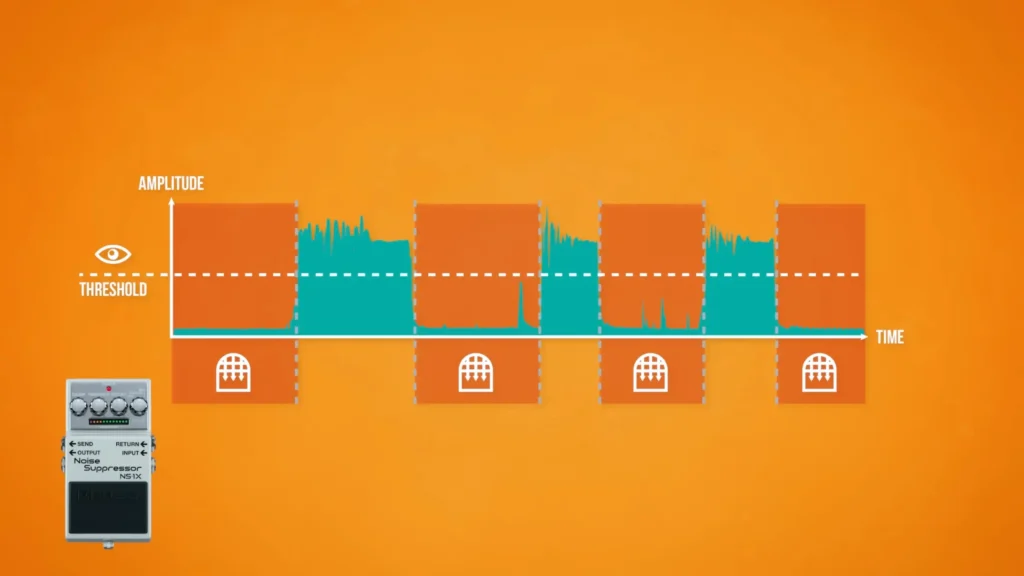
An expander draws a slope instead of a cliff. Audio below the threshold gets progressively quieter based on the ratio, so a faint rustle at -70 dB gets pushed much further down than speech tails at -59 dB.
Mini Verdict: If you need surgical, absolute removal, the gate’s hard cutoff does it. If you want noise reduction that listeners never notice happening, the expander’s slope wins.
Sound Character
A well-tuned gate is invisible. A badly tuned one announces itself constantly: the gate has to reopen every time you speak. It can give your audio a staggered, choppy feel, and a fast release chops word endings like a door slamming mid-syllable. Listeners may not know what’s wrong, but they’ll know something is.
The expander rarely calls attention to itself because nothing ever fully disappears. Speech fades into reduced room tone instead of dead silence, which our ears read as natural. It’s the trick behind podcasters who spin their chair around and keep talking without dropping off the recording.
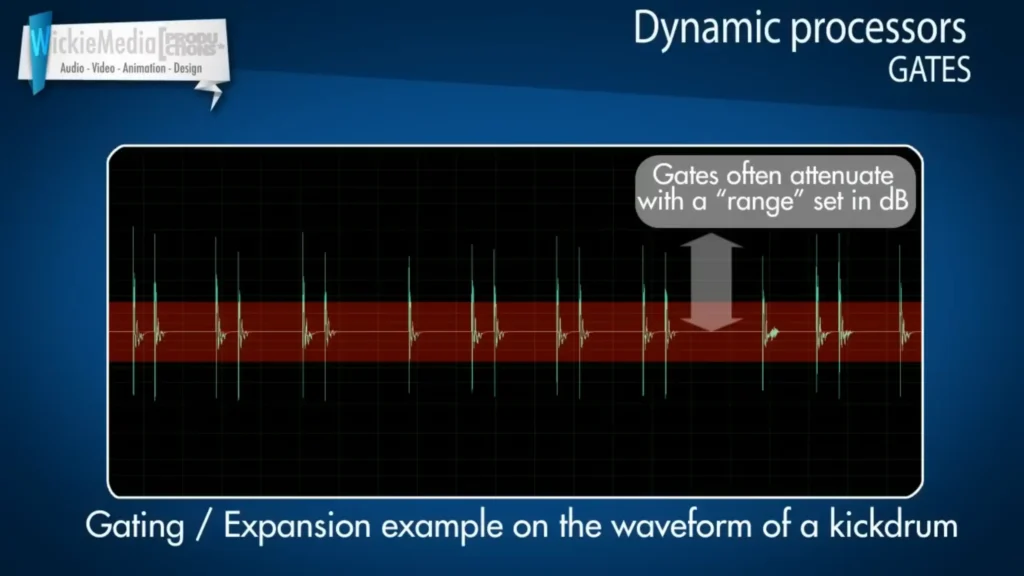
Mini verdict: for forgiving, human-sounding voice processing, the expander wins. The gate only matches it when meticulously dialed in.
Reliability With Different Speakers
A gate makes one big assumption: everyone speaks loudly enough to open it. Soft-spoken guests break that assumption fast. If their voice doesn’t reach the threshold, the gate simply never opens, and you lose entire words — the dreaded “microphone cuts out” problem, except it’s your processing, not your hardware.
An expander has no such failure mode. A quiet voice below the threshold gets reduced, not erased, so even your most soft-spoken co-host stays in the recording. You can fix levels later; you can’t fix words that were never captured.
Mini verdict: if you can’t control who talks or how loudly, the expander is the safer bet every time.
Impact on Your Workflow
In a quiet booth, a noise gate eliminates the manual work of silencing room tone, rustles, and breaths between takes. It works better for voiceover, which makes editing less labor-intensive. In a messier environment, though, a misbehaving gate creates new work: hunting down clipped words and re-recording lost lines.
The expander’s payoff shows up in multi-track sessions. Because each mic’s bleed comes down automatically and smoothly, you spend far less time in post fiddling with volume levels between microphones. What you hear during recording is close to what you ship.
Mini verdict: solo voice work in a controlled space → gate saves the most time. Conversational, multi-mic recordings → expander keeps post-production short.
One Thing Neither Tool Does
Worth flagging before you set expectations: Neither a gate nor an expander removes noise while you’re talking. They only clean the gaps. Once the gate opens or the signal sits above the expander’s threshold, everything passes through.
For noise reduction during speaking or recording, you need a quieter room, a closer mic position, or dedicated noise reduction.
When to Use a Noise Gate vs. an Expander
Using a Noise Gate if You’re
- Gaming — your mechanical keyboard, mouse clicks, and controller rumble vanish the moment you stop talking
- Streaming — OBS Studio’s built-in Noise Gate filter mutes PC fan hum and household noise between sentences, free and in real time
- Discord — voice chat doesn’t need nuance; it needs your mic to shut up when you do
- Noisy rooms — when ambient noise is loud and constant, only a full mute genuinely removes it from the gaps
These are live, single-voice situations where total silence between phrases sounds clean, and nobody is editing the audio afterward. The gate’s blunt on/off behavior is a feature here, not a flaw.
Using an Expander if You’re
- Starting a podcast — with two or more live mics, the expander reduces bleed smoothly instead of producing the gate’s echoey, open-and-shut artifacts, and it never silences a soft-spoken guest
- Voice-over — in a quiet booth, a low-ratio expander tames tiny rustles and breaths without ever pumping or chopping word endings
- YouTube videos — narration sounds more natural when room tone fades down instead of snapping to dead silence, and you keep the flexibility to lean back or turn from the mic
- Professional recordings — when the audio is the product, the expander’s forgiving slope means no lost words to re-record and less post-production fiddling with levels
Expendar works better for recorded, voice-quality-critical situations where listeners will notice processing artifacts. The expander stays invisible — exactly what you want when the recording has to sound polished.
Or Use Both Together
In an untreated room where you still want natural sound, stack them: run an expander first to smoothly tame moderate room tone, then a conservative gate set lower to fully mute the loudest pauses. Most DAWs let you chain them as plugins.
How to Set Up a Noise Gate
You can set up a noise gate in OBS Studio’s Dynamic effect, but the logic carries over to Adobe Audition, your DAW, or hardware.
- Measure your room tone. Record a few seconds of silence, zoom into the gap, and read the average level on the meter. A quiet booth might sit around -66 dB; a typical bedroom will be higher.
- Set the threshold just above that level. If your room tone averages -66 dB, try -58 dB. In OBS, set the close threshold just above your noise floor and the open threshold a bit below your normal speaking volume.
- Keep the attack fast. Human speech starts abruptly, so 1–5 milliseconds prevents clipped word beginnings.
- Slow down the release. Around 200–250 milliseconds lets the gate close gently instead of slamming shut and chopping word endings.
- Add a short hold. Roughly 25–30 milliseconds stop the gate from fluttering closed during the tiny pauses inside your sentences.
- Test and watch the meters. Speak normally. If the gate indicator flickers mid-sentence or words get clipped, lower the threshold or lengthen the hold until it stays open through your speech.
How to Set Up an Expander
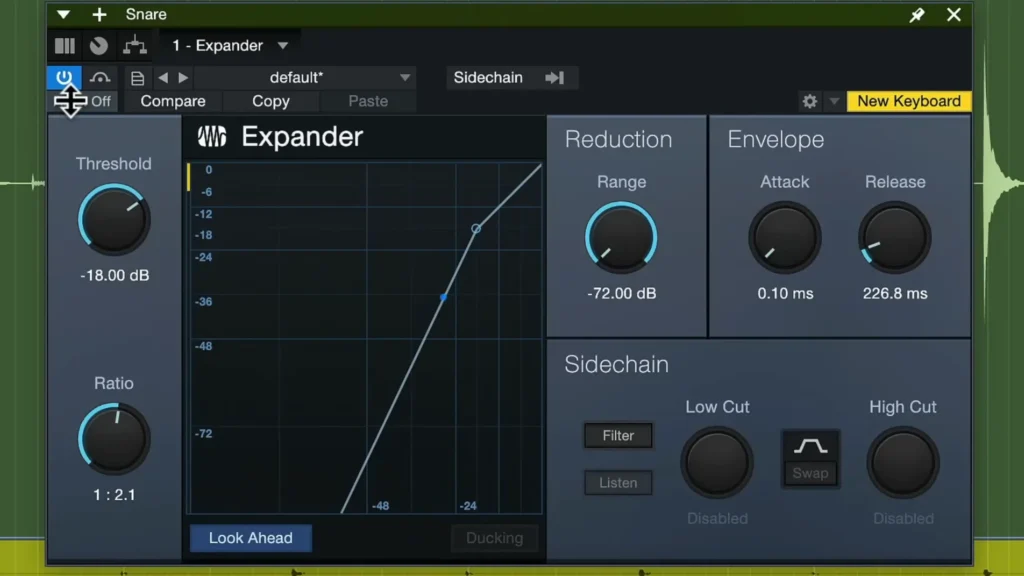
- Find your threshold the same way. Measure room tone and set the threshold just above it — the same level that works for your gate is a solid starting point.
- Start with a moderate ratio. A 2:1 or 3:1 ratio reduces noise noticeably without sounding processed. Remember: at 3:1, every decibel below the threshold gets pushed down three.
- Match attack and release to your voice. Fast attack, moderate release — the same instincts you’d use on a gate apply here.
- Watch the gain reduction meter. Play back your recording and confirm the expander only works during gaps, not during speech.
- Adjust for your situation. Two mics in one room? You can run the threshold higher — around -20 dB on some hardware setups — because each speaker sits right on top of their own mic and easily clears it, while bleed from across the table doesn’t.
Find the Best Noise Reduction Solution
The noise gate and the expander solve the same problem with different amounts of force. The gate mutes everything under your threshold, while the expander turns quiet audio down by a ratio.
If you game, stream, or hang out in Discord from a noisy room, start with a gate. If you podcast or record a voice-over where you prioritize audio quality, reach for the expander first. Whichever you choose, measure your room tone before touching the threshold. This habit fixes most “my microphone cuts out” before they start.
FAQ
Why does my mic cut out mid-sentence with a noise gate on?
Your threshold is set too high, or your release is too fast. Lower the threshold so soft syllables still clear it, slow the release to 200 milliseconds or more, and add a 25–30 millisecond hold so brief pauses don’t close the gate.
Is an expander just a gentler noise gate?
Functionally, yes. A gate fully mutes audio below the threshold, while an expander reduces it by a set ratio — and that gentler response is exactly why expanders sound more natural on voice.
Can a noise gate remove background noise while I’m talking?
No. Once the gate opens for your voice, everything else in the room comes through with it. Gates and expanders only clean the gaps between speech. For noise under your voice, treat the room, move the mic closer, or use dedicated noise reduction.
Which should I use for a two-person podcast?
An expander. Gates on two live mics cause echo-like artifacts when room reflections or laughter trigger the wrong mic, and they can miss soft-spoken guests entirely. An expander reduces bleed smoothly and saves you mixing time afterward.
What’s a good starting threshold for my noise gate settings?
Measure first. Record silence, check your room tone level on the meter, and set the threshold a few decibels above it. A quiet booth might land near -58 dB, while a two-mic podcast setup on hardware might work better around -20 dB. It decides your room.
