
Signal-to-Noise Ratio Guide: What Microphone SNR Really Tells You

When you check what you record in a quiet room, you might find that a thin layer of hiss sits underneath your voice in your quiet room. Every active microphone generates a small amount of its own noise, all the time, whether or not anything is making a sound in front of it.
Signal-to-noise ratio is the spec that describes this. It shows as a single number with a “dB” after it. The microphone SNR is more useful than that, and also more limited than that. What does SNR actually mean in your microphone? We’ll break it down in this article.
What Is Signal-to-Noise Ratio in a Microphone?
What Is a “Signal”?
The signal is the sound you’re trying to capture. Your voice on a podcast. A guitar. A drum kit. A guest on the other side of the table. Anything you’d be annoyed to lose in the mix is signal.
What Is “Noise”?
Noise is everything else in the output that you didn’t want. External noise comes from outside the mic — traffic, an air conditioner, a computer fan, wind, or electrical interference picked up along the cable run.
Internal noise comes from the microphone itself. This is self-noise, and it’s the part SNR is built around. A microphone sitting in a treated booth with nobody in it still puts out a low-level hiss, because the components inside it are generating it.
What Does Microphone SNR Tell You?
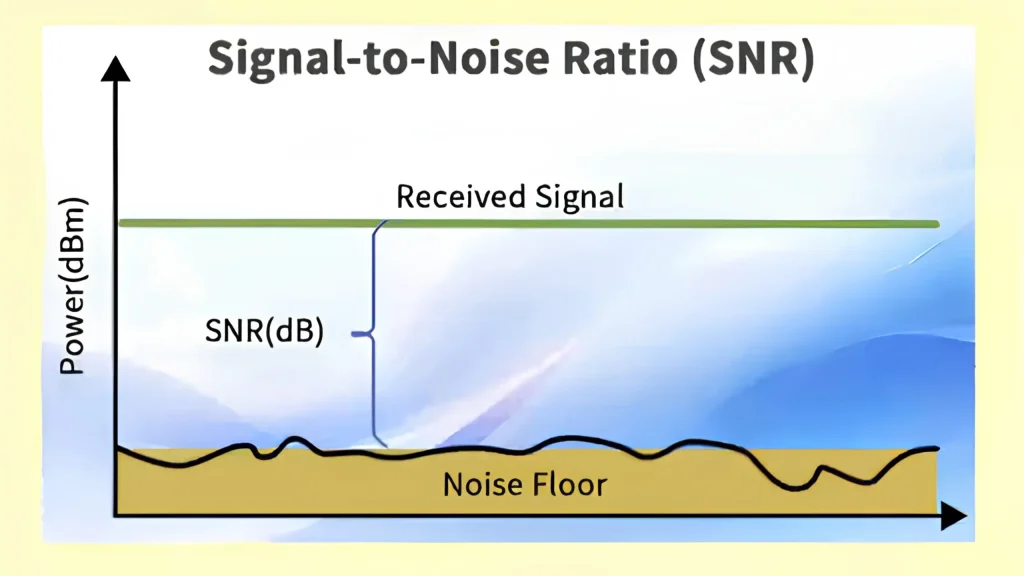
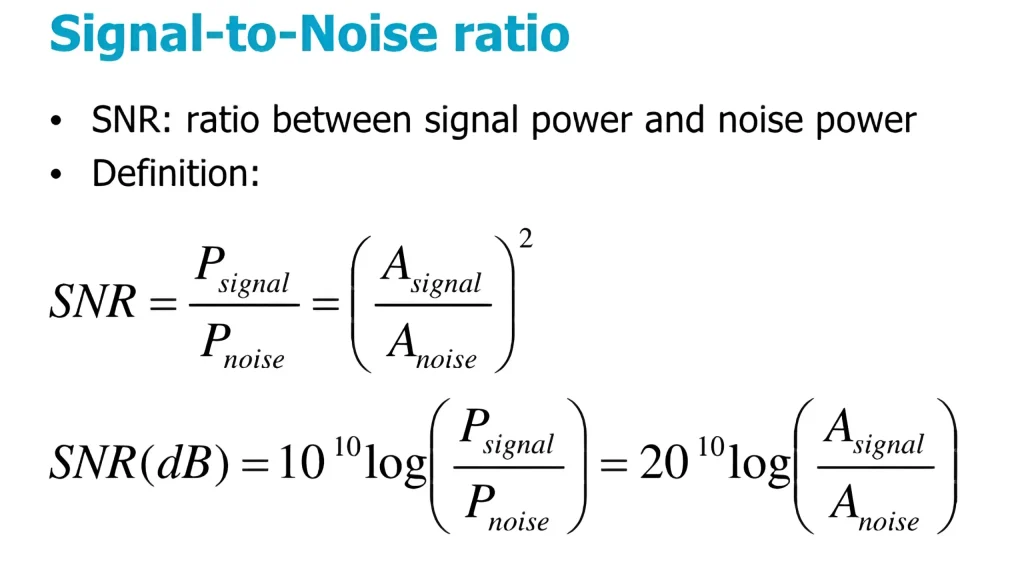
SNR(S/N) is the ratio between the signal you want and the noise the microphone adds. It’s expressed in decibels, and higher generally means a cleaner starting point.
The intuition is simpler: think of noise as the floor of a room and your signal as a table sitting on top of it. SNR is the gap between the two. A big gap means you can look at the table without seeing much floor. A small gap means the floor is always in frame.
So, when does signal-to-noise ratio actually matter?
- Quiet sources like soft speech or whispered narration. The signal starts close to the noise floor, so there’s barely a gap to work with.
- Quiet rooms like podcasts or treated spaces. Your mic here becomes the loudest noise source in the chain. That’s exactly when self-noise is easiest to hear.
- Distance. In a free field, sound level drops about 6 dB every time you double your distance from the source. Step from 1 foot to 2 feet and you’ve lost 6 dB of signal. The mic’s self-noise doesn’t drop with you — it stays put.
So every step backward eats directly into the gap, which is why boom mic positions demand far better noise performance than a mic sitting 4 inches from someone’s mouth. The quieter the sound you’re trying to capture, the more the microphone’s noise performance matters.
What Is Microphone Self-Noise?
Relating to the microphone SNR, self-noise is the noise a microphone produces on its own, with no sound reaching it. Microphone noise comes mainly from two areas:
- Acoustic components: Small gaps, slits, meshes, and membranes in the sound path can generate small amounts of noise as sound passes through them.
- Electronic components: After the diaphragm converts sound into an electrical signal, the microphone’s electronics—such as amplification circuits and, in digital microphones, the analog-to-digital converter—can add their own noise. Distortion introduced along the signal path can also contribute to the overall noise.
In a recording, microphone self-noise sounds like broadband hiss, closer to the sound of air. In mild cases, it just takes a little polish off the recording. In bad cases, it competes with the source and breaks the soft material.
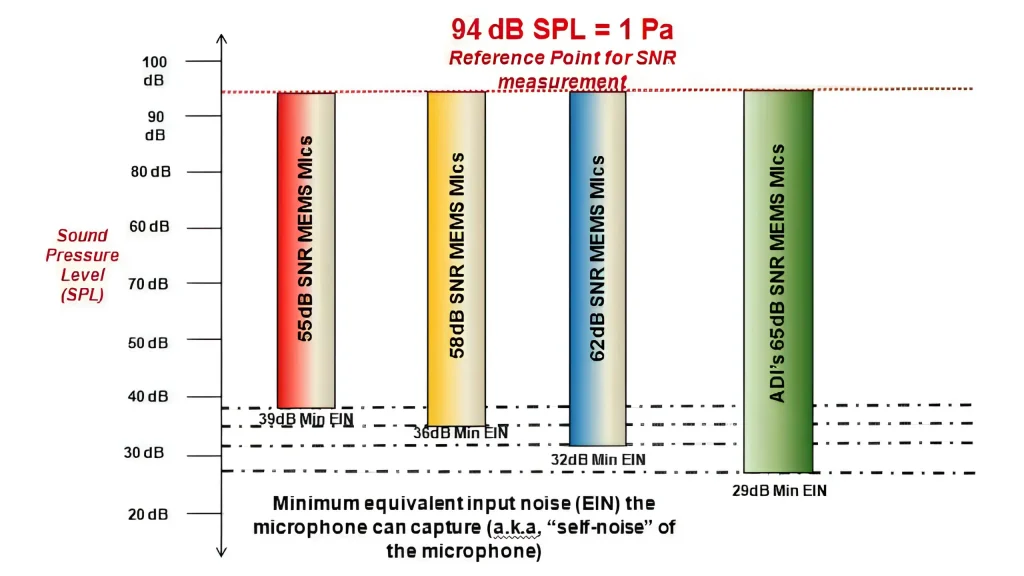
Self-noise stays at a constant level. So the loudness of what you’re recording is what determines the gap. Sing loudly into a mic and the hiss disappears under your voice. Whisper into the same mic and the hiss is suddenly right there next to you.
Two Self-Noise Examples
| Mic A | Mic B | |
|---|---|---|
| Self-noise | 14 dB(A) | 24 dB(A) |
| SNR | 80 dB | 70 dB |
| Loud, close-up speech | Both sound clean | Both sound clean |
| Soft narration, quiet passages | Hiss stays buried | Hiss sits just under the voice |
| Fade-ins and pauses | Near-silent | Audible hiss between phrases |
The voice itself is identical. What changes is what you hear behind it — and it only becomes obvious when the voice gets quiet or stops.
Microphone SNR Value: Is Higher the Better?
Under comparable measurement conditions, yes. A higher SNR means your signal sits farther above the microphone’s noise, which gives you more room to raise levels, cut in and out, and use compression without pulling hiss up with everything else.
What Does the Number Actually Tell You?
Decibels are logarithmic, so small-looking differences aren’t small.
| SNR | What it means in practice |
|---|---|
| 60 dB | Fine for loud, close sources. Hiss becomes obvious on soft material or when you push gain. |
| 70 dB | A common baseline for solid consumer and semi-pro mics. Handles most speech work at normal distance. |
| 75 dB | Noticeably cleaner. More headroom for quiet passages and heavier processing. |
| 78 dB and above | The mic is in low-noise territory |
| 84 dB and above | Self-noise is effectively inaudible even on very soft sources. |
A 10 dB difference — say 65 dB versus 75 dB — is a real, audible change in how much floor you hear, not a rounding difference. A 2 dB difference between two competing mics is not something you’ll pick out in a blind listen.
Can You Compare SNR Numbers Directly?
Not always. Four things have to match first:
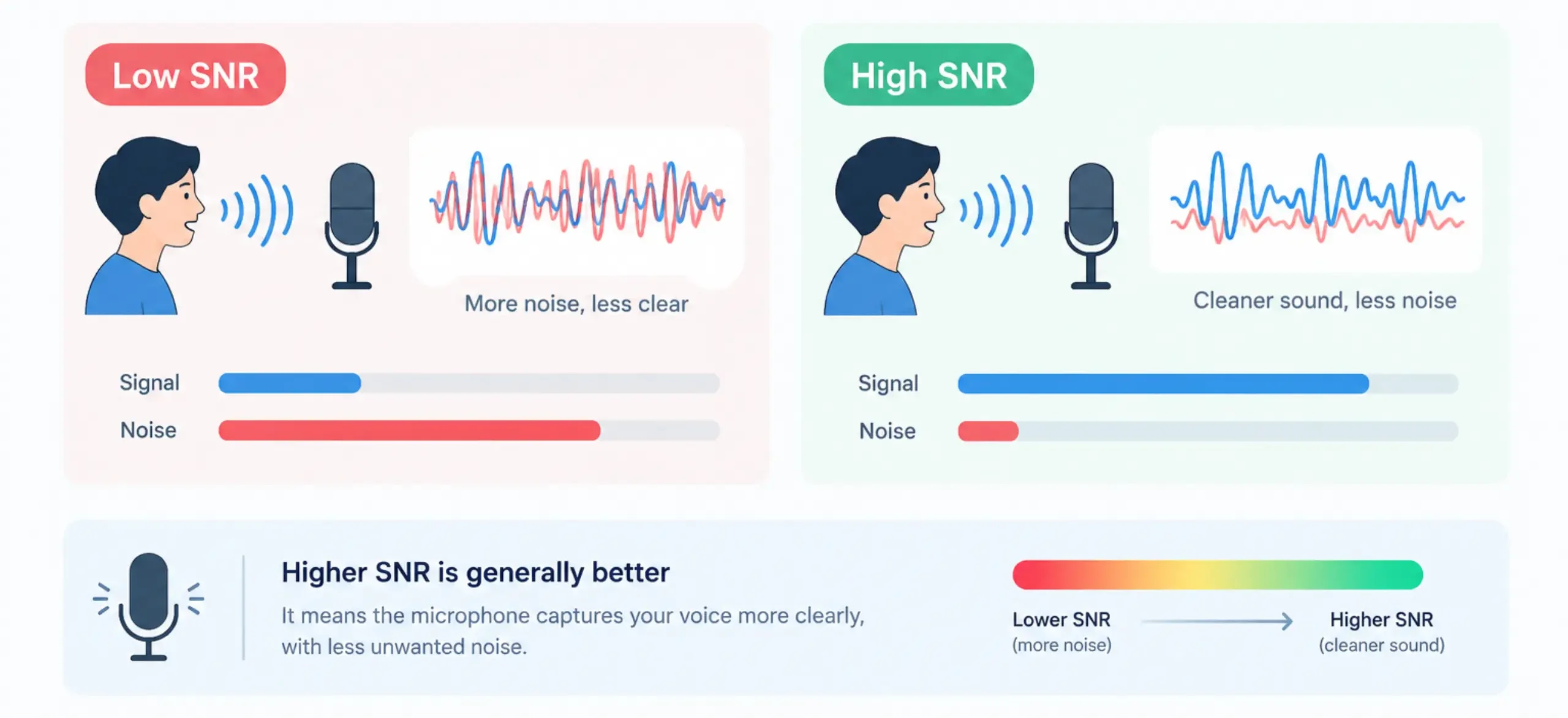
- Reference level. Most SNR figures use a 94 dB SPL test tone as the signal. A different reference shifts the number.
- A-weighting. A-weighted figures account for how the ear hears different frequencies. Unweighted numbers look worse for the same mic.
- Bandwidth. A wider measurement range captures more noise.
- Measurement conditions. Self-noise has to be measured somewhere genuinely quiet. A noisy test space contaminates the result.
Some brands publish equivalent noise level, or EIN, instead — the same information stated the other way around. Subtract the SNR from 94 to get it, so 60 dB SNR means roughly 34 dB(A).
Technical note: 94 dB SPL is one pascal of sound pressure, the standard test input for microphone noise measurement. It’s also why a 94 dB SNR would need a mic with zero self-noise — you’ll never see one.
SNR vs. Microphone Sensitivity: What’s the Difference?
These two get confused constantly, and they measure different things.
| Sensitivity | SNR | |
|---|---|---|
| What it measures | How much output the mic produces for a given sound level | How far the wanted signal sits above the mic’s own noise |
| Typical unit | mV/Pa or dBV/Pa | dB, usually A-weighted |
| Tells you | How much preamp gain you’ll need | How clean the recording starts out |
| Higher is | Louder output | Quieter noise floor |
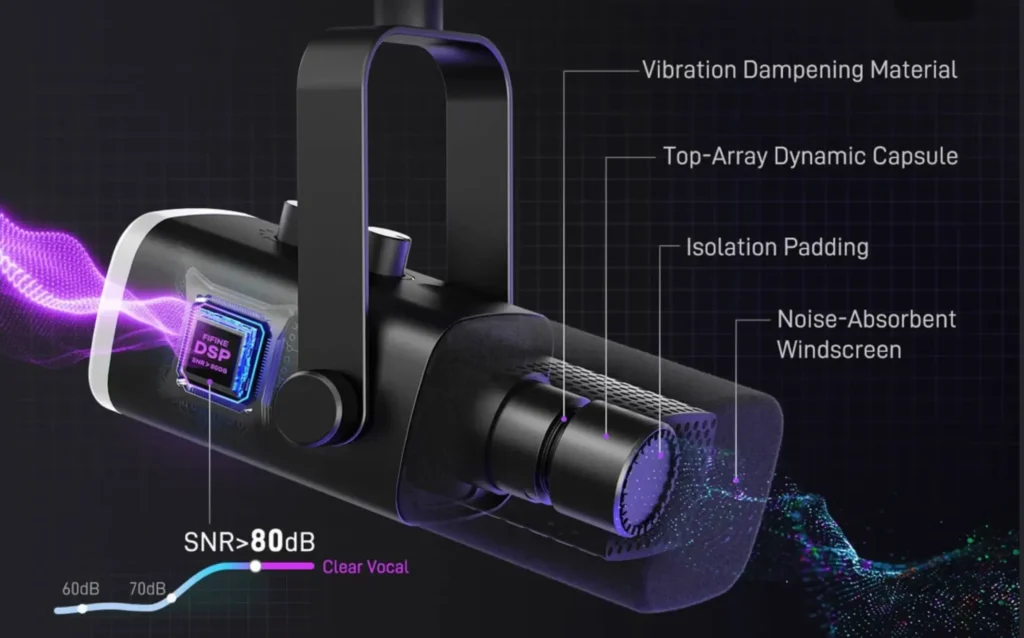
| Example (fifine AM8 microphone) | -50±3dB | 80dB |
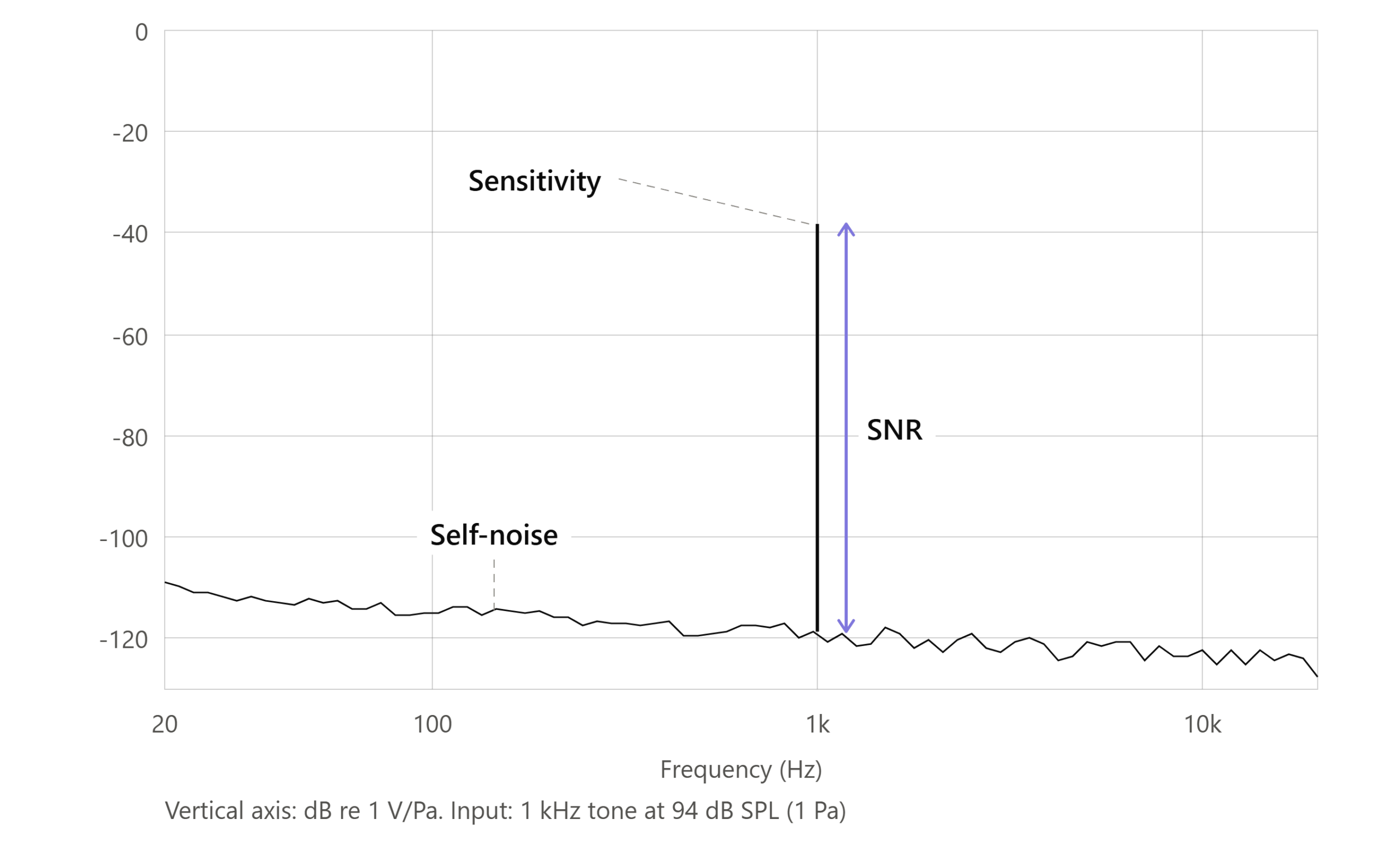
A microphone can be highly sensitive and still be noisy. Microphone sensitivity describes how loud the output is — it says nothing about what’s mixed into that output.
“Louder output” doesn’t mean “cleaner recording”: amplification raises the signal and the noise by the same amount. Turn up the preamp and the gap between them stays exactly where it was. The only thing that changes is that you now hear the hiss more clearly, plus whatever noise the preamp adds on its own.
Simply put, sensitivity affects how you get to a usable level. SNR affects what’s underneath it.
What Other Microphone Specifications Should You Look At?
Signal-to-Noise Ratio describes one thing well. But it won’t tell you whether the mic flatters your voice, whether it survives a loud snare, or whether it picks up your roommate through the wall. There are more things you should know when choosing a microphone.
| Specification | What it means in simple terms |
|---|---|
| SNR | How far the desired signal is above the noise |
| Sensitivity | How much output the microphone produces |
| Frequency response | How the microphone reproduces different frequencies |
| Maximum SPL | How loud a sound the microphone can handle |
| Polar pattern/directionality | Which directions the microphone picks up sound from |
| THD | How much the microphone distorts loud sounds |
These interact more than a spec sheet suggests.
Self-noise sets the bottom of the usable range, and maximum SPL sets the top — the distance between them is your working dynamic range.
Polar pattern does a job Signal-to-Noise Ratio can’t touch. A cardioid microphone, like fifine AM8 microphone, will catch the sound in front of the mic most clearly. The omnidirectional mode, like the fifine K690 microphone or the boom mic in fifine H13 gaming headset, will pick up the sound equally from all directions. This is no amount of dB on a spec sheet will do for you.
And frequency response decides whether the result sounds like you, which is usually the thing listeners actually notice. So a good microphone can’t just feature the highest signal-to-noise ratio.
A Simple Guide to Choosing a Microphone
Here’s how to turn all of the above into a decision.
Step 1: Check the SNR. Find the number. 70 dB(A) as a working floor, 74 dB(A) and up, like 80 dB in fifine AM8 microphone, for serious quiet-source work.
Step 2: Check whether the numbers are comparable. Look for the “(A)” and the reference level.
Step 3: Look at sensitivity and frequency response. Sensitivity tells you how much gain you’ll need from your interface. Frequency response tells you what the mic will do to your voice or instrument.
Step 4: Consider your recording environment. Untreated room with traffic outside? Your room noise is already louder than the mic’s self-noise, so SNR stops being your bottleneck.
Step 5: Consider how close you’ll be. Close-miking gives you a strong signal and makes SNR less critical. Recording from a boom, across a desk, or in a room position costs you roughly 6 dB per doubling of distance, and that’s when noise performance starts to earn its keep.
Step 6: Choose on the whole spec set, not one number. Line up your shortlist against the table above and pick the mic that fits your source, your room, and your distance.
Wrapping Up
Signal-to-noise ratio describes something real: the gap between what you want to record and the hiss your microphone adds. As microphone self-noise doesn’t move, this gap is fixed at the bottom. So the loudness and distance of your source decide whether you ever hear it.
But microphone SNR isn’t the only one that influences your audio quality. Other microphone specifications, like polar pattern, frequency response, and maximum SPL, will shape your recordings far more.
So, browse the whole mic specs, compare noise specs side by side, and find the mic that fits how you record.
FAQs
What is a good SNR for a microphone?
Around 70 dB(A) is a reasonable baseline, and 74 dB(A) and above is generally considered good. For very quiet sources, look for 84 dB(A) or higher. For loud sources like drums or amps, a lower figure is perfectly usable.
Is a higher SNR always better?
Better on paper, yes — but only when both mics were measured the same way, and only up to the point where self-noise is already below what you can hear. Past that, other specs will affect your recording more.
Can I fix a low SNR after recording?
Partly. Noise reduction tools like iZotope RX and Waves Clarity Vx can clean up hiss, but they work by removing audio, and pushing them hard leaves artifacts on the voice.
Why does my mic sound noisier when I turn up the gain?
Because gain raises the signal and the noise by the same amount. If you need a lot of gain to reach a usable level, you’re likely too far from the mic or using a mic with low output.
Do dynamic microphones have self-noise?
Self-noise specs are published mainly for active microphones, which contain powered electronics that generate noise. Passive dynamics generate far less internally, which is why the figure often isn’t listed for them. That’s not a free pass, though — a dynamic mic still picks up everything happening in your room.
