
Sample Rate vs. Bit Depth: Digital Audio Basics Every Creator Should Know

Walk into any recording session, and you’ll hear engineers debate sample rate vs bit depth. The two terms get lumped together because they live next to each other in your DAW’s audio settings, but they describe completely different things. Overall, the sample rate is how often you capture sound, while bit depth is how accurately you capture it.
The key is, are they more equals better? Which one should you care about most? That’s what we’re talking about soon, from their definition to the key difference. Finally, let you understand the digital audio basics better.
Quick Comparison Table
| Dimension | Sample Rate | Bit Depth |
|---|---|---|
| Definition | Number of audio snapshots taken per second | Number of possible amplitude values per snapshot |
| Core Characteristics | Measured in kHz; affects frequency response | Measured in bits; affects dynamic range |
| Best Used For | Capturing frequency and pitch detail | Capturing volume detail and dynamic range |
| Common Applications | 44.1 kHz (CD), 48 kHz (video), 96 kHz (high-res music) | 16-bit (CD), 24-bit (pro audio), 32-bit (specialized) |
What Is Sample Rate?
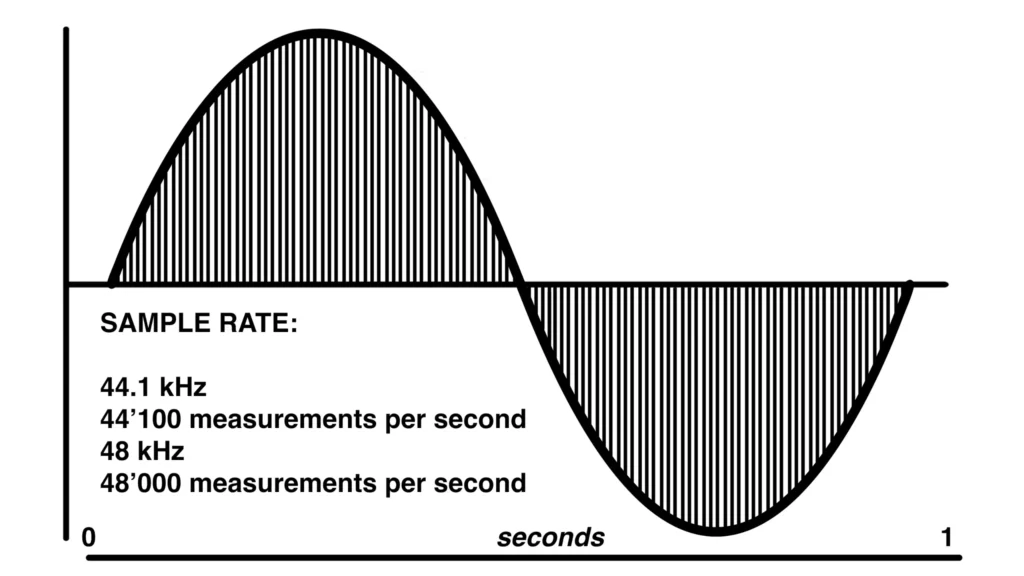
Sample rate refers to how often a digital system takes a snapshot of incoming audio every second. The sample rate works like a video camera. The camera takes the video with 24 frames per second, so you can see a smooth video. The more samples per second, the more accurately your system reproduces the original sound wave.
Sample rate is measured in kilohertz (kHz). Common rates include 44.1 kHz, 48 kHz, 88.2 kHz, and 96 kHz. The number tells you how many slices of audio your computer captures every second.
Why It Matters: The Nyquist Theorem
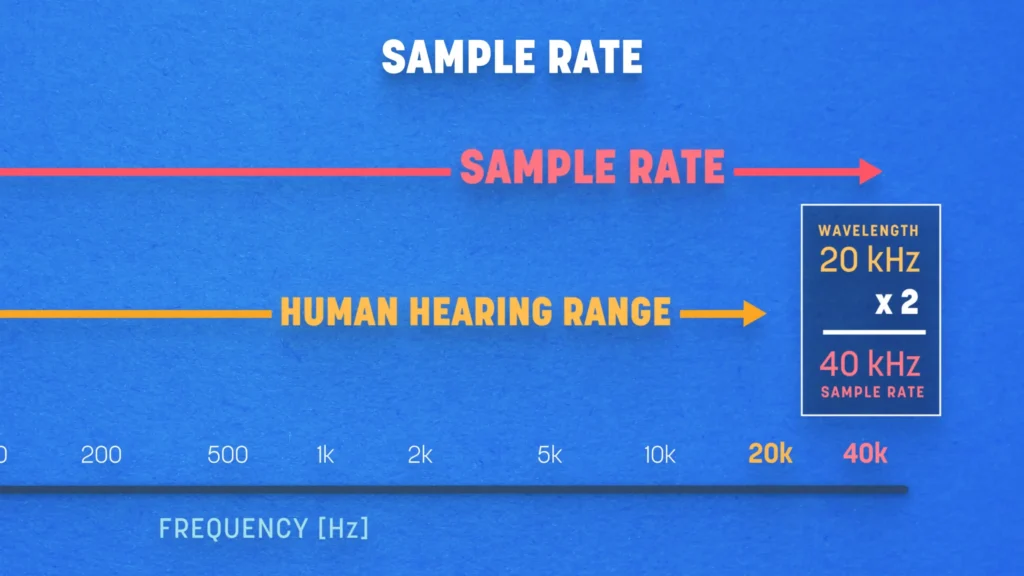
The reason sample rate matters comes down to the Nyquist theorem. To accurately capture a frequency, you need to sample its wave at least twice per cycle. Once for the high-pressure peak and once for the low-pressure trough. Humans hear roughly 20 Hz to 20 kHz, so a sample rate of at least 40 kHz is needed to reproduce the full range we can hear.
Why 44.1 kHz and 48 kHz Are the Standards
If 40 kHz covers human hearing, why don’t we just use 40 kHz? The extra headroom in 44.1 kHz and 48 kHz gives anti-aliasing low-pass filters a gentler slope to work with. Without that filter cushion, frequencies above the system’s limit fold back into the audio as weird artifacts — a phenomenon called aliasing.
44.1 kHz became the long-standing standard for audio-only formats, while 48 kHz took over for anything paired with video. If you’re recording for a podcast that lives on Spotify, 44.1 kHz is fine. If your audio will end up in a YouTube video, TikTok, or any video platform, 48 kHz is the safer call.
Pros of higher sample rates:
- Cleaner reproduction of high frequencies
- More room for pitch-shifting or slowing audio without losing definition
- Less aggressive filtering needed at the conversion stage
Cons of higher sample rates:
- Bigger file sizes
- More CPU load on your DAW
- Diminishing returns past a certain point — most listeners can’t hear the difference
What Is Bit Depth?
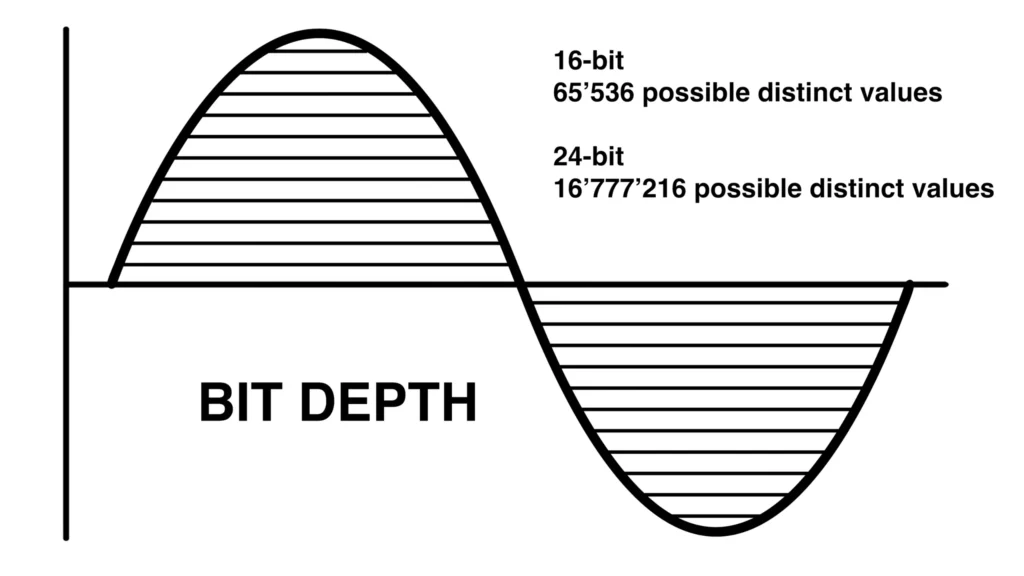
While sample rate handles how often you capture audio, bit depth handles how precisely you measure each capture. Bit depth determines how many possible amplitude values exist for every single sample. Amplitude is just another word for level — how loud or quiet a sound is at any given instant.
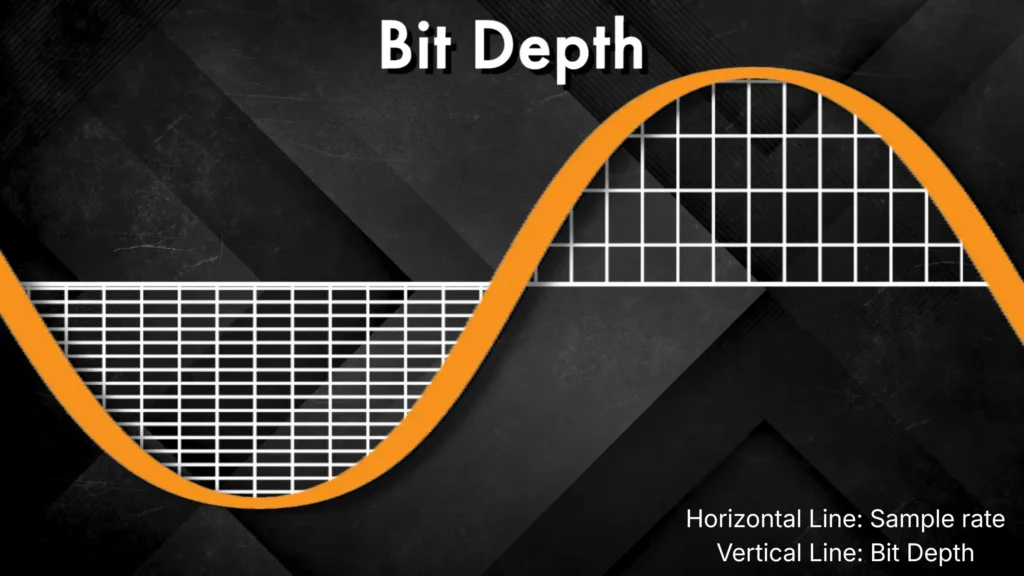
Picture a graph. Sample rate sets the horizontal grid (how often samples are taken), and bit depth sets the vertical grid (how finely each sample’s level can be measured). The more vertical values available, the closer your digital recording gets to the original analog signal.
Common Bit Depths:
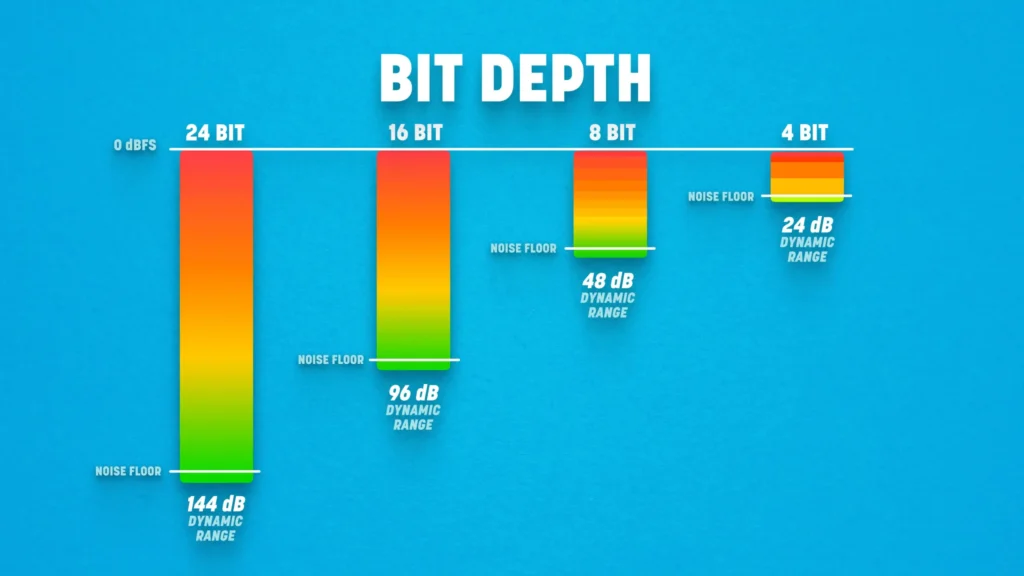
- 16-bit: 65,536 possible values, around 96 dB of dynamic range
- 24-bit: roughly 16.7 million values, around 144 dB of dynamic range
- 32-bit float: over 4 billion values, with a theoretical dynamic range so massive it exceeds anything you’d ever record on Earth
When a sample falls between two bit-depth values, the system rounds it to the nearest one through a process called quantization. Lower bit depths produce more rounding errors, which is why 16-bit can sound slightly grittier in quiet passages than 24-bit.
Pros of higher bit depth:
- Wider dynamic range (less risk of clipping or noisy quiet sections)
- Better headroom for editing and mixing
- Smoother handling of subtle volume changes
Cons of higher bit depth:
- Larger files
- 32-bit is overkill for most everyday recording
Sample Rate vs Bit Depth: Key Differences
Take a quick glance at the sample rate vs bit depth before digging into specifics:
| Aspect | Sample Rate | Bit Depth |
|---|---|---|
| What it determines | High-frequency detail | Dynamic range |
| What you hear | Clarity and air | Cleanness and noise floor |
| Where it matters most | Capture and pitch processing | Tracking, editing, and mixing |
| Common myth | Higher is always better | |
1. Use Cases
The sample rate primarily affects how high and low your recording can capture. If you’re tracking cymbals, sibilance-heavy vocals, acoustic guitar harmonics, or anything with airy top end, sample rate matters. It also factors into sound design work, where you might pitch a sample down two octaves and want the high frequencies to survive the journey intact.
Bit depth primarily affects how cleanly you capture both whisper-quiet and full-volume sounds in the same take. If you’re recording dynamic vocals, live drums with fluctuating levels, or orchestral material with quiet passages and loud crescendos, bit depth carries more weight. It also works well for podcast recording: when guests speak at different volumes, 24-bit gives you a noise floor low enough that boosting quiet voices in post won’t introduce hiss.
Mini verdict: For frequency-heavy detail, prioritize sample rate. For dynamic detail, prioritize bit depth. In practice, you adjust both — but they solve different problems.
2. How They Work in Practice
A higher sample rate doesn’t make your vocals sound “richer”. It helps your system capture and reproduce ultra-high frequencies more accurately, which matters most for slowing audio down or pitch-shifting it later. But for straight-ahead recording, where playback happens at the same speed as capture, the audible difference between 48 kHz and 96 kHz stays subtle.
A higher bit depth, on the other hand, gives you cleaner gain staging. You can record at lower, safer levels without picking up digital noise, and push faders harder during mixing without artifacts creeping in. This is why most pros track at 24-bit. The extra headroom protects you during the messy middle stages where mistakes happen.
Mini verdict: Sample rate matters most at the capture and pitch-manipulation stages. Bit depth matters most during editing, mixing, and quiet-passage clarity.
3. Common Misconceptions
- Is 16-bit “outdated”? Not at all. It’s still the CD standard and works fine for distribution — just not ideal for tracking and editing, where 24-bit gives you more breathing room.
- Should you always record at the absolute maximum your interface allows? Not recommend. It just creates oversized files that strain your storage and CPU without giving most projects any audible benefit.
- Are sample rate and bit depth the same as bit rate? Totally not. Bit rate is a compression metric used in formats like MP3 — it’s a different number with a different job, even though the term sounds similar.
Mini verdict: Settings are a foundation, not a fix. Get the room, the mic, and your gain right first.
Why Higher Numbers Don’t Mean Better Audio
Take 96 kHz vs. 48 kHz. The 96 kHz behaves more predictably with more samples to work with during processing. Some engineers can “feel” the slight difference in a tuned studio with high-end monitors. But for AirPods or Bluetooth speaker users, the difference is hard to hear.
Bit depth follows the same logic. Going from 16-bit to 24-bit is a real upgrade for tracking, because the extra dynamic range gives you margin for error during recording. Jumping from 24-bit to 32-bit float is useful for specialized scenarios like field recording. For most home setups, it’s overkill.
Settings can’t outperform your room, mic, or technique. What actually matters for a better audio?
- Your microphone choice: condenser vs dynamic? XLR vs USB mic? Your mic should match your voice.
- Your room’s acoustics: how to reduce noise in your room for recording, like sound reflections, bass, or a noisy AC vent?
- Audio format: record to WAV or AIFF; MP3 compresses away detail you can’t get back
- Mic placement and proper gain staging: six inches off-axis often beats six inches on-axis, and aim for peaks around -12 dB
- Your audio interface’s converters: cheap ADCs add noise and color before your DAW ever sees the signal
Best Settings for Different Use Cases
| Use Case | Sample Rate | Bit Depth | Why |
|---|---|---|---|
| Podcasts & voice-over | 48 kHz | 24-bit | Video-platform compatible, clean editing margin |
| Music production | 48 or 96 kHz | 24-bit | Higher rate helps if you’re pitching or stretching audio |
| Streaming & gaming | 48 kHz | 16 or 24-bit | Platforms downsample anyway; saves CPU |
| CD distribution | 44.1 kHz | 16-bit | The legacy CD standard |
| Field recording | 96 kHz | 32-bit float | Rescues unexpected loud transients from clipping |
A couple of practical notes:
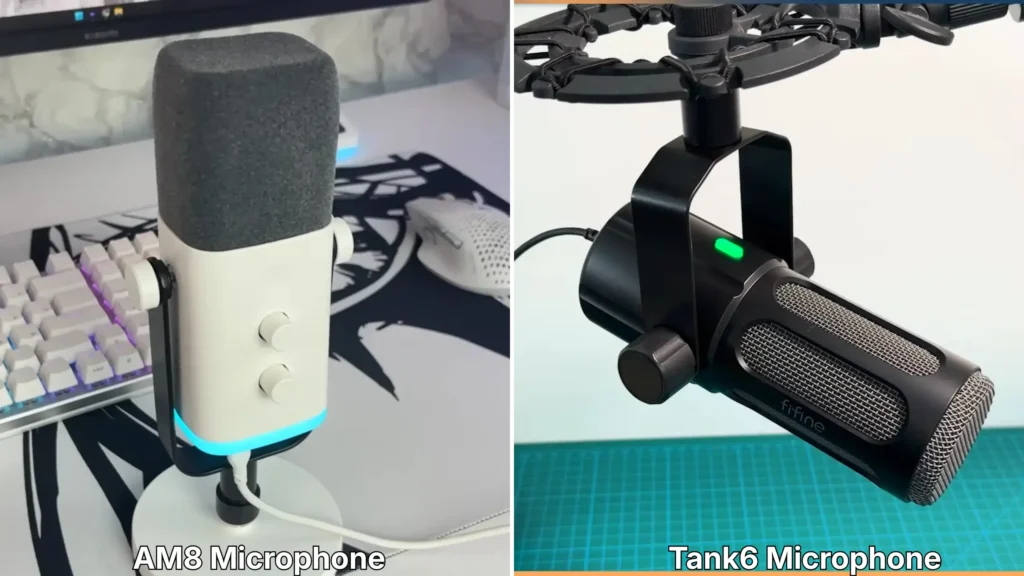
- For streaming, the FIFINE AM8 dynamic microphone with 16-bit/44.1-48 kHz gets your clear audio. For podcasting, the FIFINE Tank6 dynamic mic, featuring 192kHz/24bit, gets you broadcast-ready audio without a complicated signal chain.
- For music producers, stick with 24-bit unless your gear supports 32-bit float and your workflow actually needs it.
- When in doubt, record at the highest setting you’ll realistically need, then bounce down at the export stage.
Final Words
What is the real difference between sample rate vs bit depth? They’re partners for the digital audio. For most creators, 48 kHz / 24-bit is the everyday sweet spot. If you need heavy processing or pitch work, the sample rate and bit depth can go higher.
Both contribute to the foundation of a digital recording, but neither will compensate for a bad room or the wrong mic. The “best” setting depends on the gig, not on whichever number is biggest. Make your room quiet, pick the right mic, and set up your gear properly. A better audio quality is not far away from you.
FAQ
Can I change the sample rate or bit depth after recording?
You can convert downward (96 kHz to 48 kHz, 24-bit to 16-bit) without issue. Converting upward doesn’t add detail; it just makes the file bigger. Always record at the highest setting you’ll need, then export down for delivery.
Will a higher sample rate make my microphone sound better?
No. Sample rate captures whatever the mic feeds it. Upgrading your mic, treating your room, and dialing in your gain will make a far bigger difference than tweaking settings.
Why is 44.1 kHz the CD standard instead of 40 kHz?
The Nyquist theorem says you need at least 40 kHz to capture our 20 kHz hearing limit. The extra 4.1 kHz of headroom lets anti-aliasing filters work with a gentler slope, preventing audible artifacts. The exact number traces back to early digital storage methods that piggybacked on videotape formats.
Should I use 32-bit float?
Only if your interface supports it and your workflow benefits, like field recording or sessions with unpredictable transients. For typical home use, 24-bit gives you all the headroom you’ll need.
Does a higher sample rate hurt my computer’s performance?
It can. Higher sample rates mean more data per second, which means more CPU and disk activity, especially with lots of plugins running. If your DAW is struggling, dropping back to 48 kHz usually fixes it without any audible loss.
