
Lossless Audio Explained: The Truth About Sound Quality

Lossless audio is everywhere in your music apps now. It’s a digital audio format that compresses files without throwing away any of the original sound information. Decompress a lossless file and you get something bit-for-bit identical to the source. That’s not how MP3 or AAC work, which permanently delete data to shrink the file.
So, how does lossless audio actually work, and will you really hear a difference? Let’s walk through it. The goal here is simple: stop you from buying a “lossless” product that won’t deliver lossless playback in your real-world setup.
What Is Lossless Audio?
Pros
- Preserves the full audio file as the artist mastered it
- Can reveal more depth, body, and punch in well-recorded tracks
- Future-proof — you’re not locked into compression artifacts
cons
- File sizes are roughly five to ten times bigger than MP3s
- Requires a wired connection for true lossless playback
- The difference is genuinely hard to hear for most listeners in most situations
Start with a WAV file. That’s an uncompressed digital audio file, and it’s huge — a 60-minute album can run a gigabyte or more.
People figured out you could shrink that same album down to about 100 MB using MP3. The catch? MP3 permanently throws away parts of the audio it decides aren’t important to your ears. That’s a lossy format.
Lossless formats like FLAC and ALAC (Apple Lossless Audio Codec) take a different route. They squeeze the WAV down to about half its original size, but nothing gets discarded. Decompress a FLAC and put it next to the original WAV — they’re identical, every bit of them.
Think of it like zipping a folder on your computer. The zipped file is smaller, but every document inside comes back exactly as you left it. Lossy compression is more like photocopying that folder, then shredding the originals.
The numbers behind the formats:
- AAC (lossy): Apple’s preferred lossy codec since 2001, capped at 256 kbps
- MP3 (lossy): Common bitrates of 128 kbps and 320 kbps
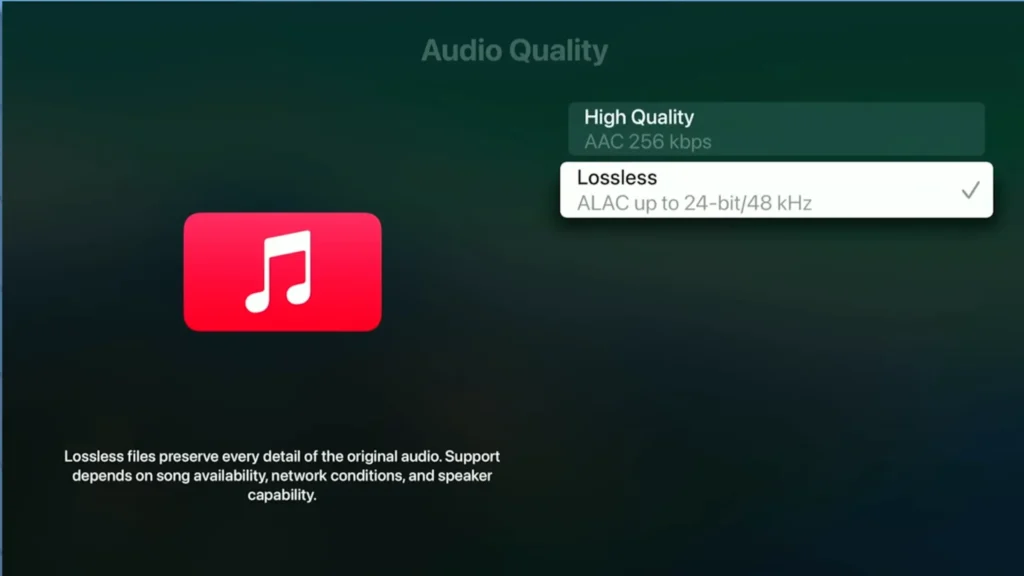
- CD-quality lossless: 16-bit, 44.1 kHz — equivalent to 1,411 kbps
- Hi-Res lossless: Up to 24-bit, 192 kHz
How Does Lossless Audio Work?
Compressed formats lean on something called psychoacoustic models — algorithms built to mimic how human hearing actually works. Our ears are most sensitive to mid-range frequencies, so MP3 and AAC chop away more aggressively at the high and low ends. The hope is that the missing pieces slip past you without you noticing.
Lossless audio skips that step entirely. The file gets smaller through smart encoding, not by deleting anything. That’s why FLAC files are bigger than MP3s but still smaller than WAVs.
The Trade Off
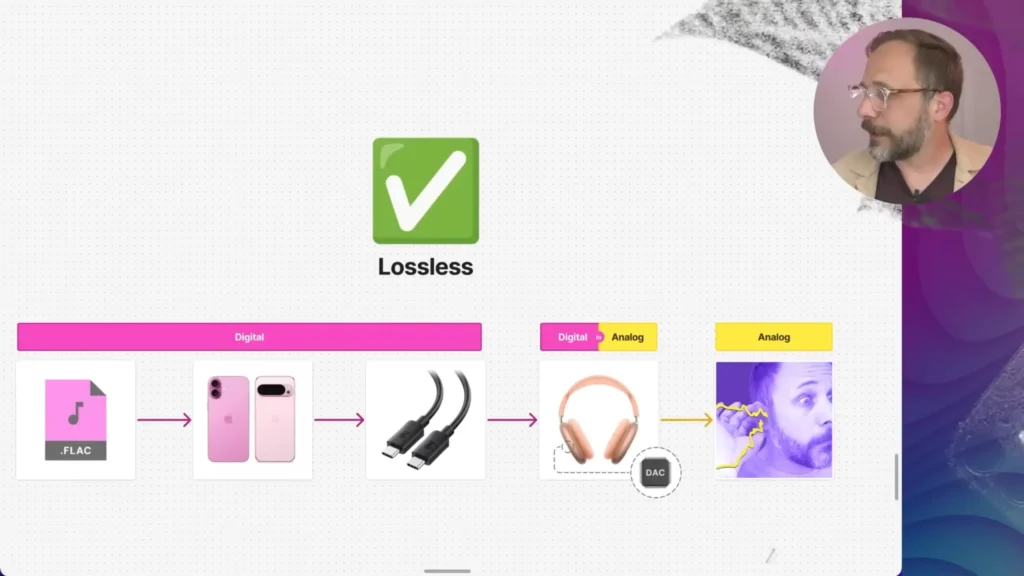
You wonder why your lossless file even sounds lossy. That’s because your playback chain does not support it from end to end, for example:
- The source file has to be lossless (FLAC, ALAC, or WAV).
- The connection between your device and your headphones has to carry the file without recompression.
- The DAC (digital-to-analog converter) inside your headphones or dongle has to convert the file faithfully.
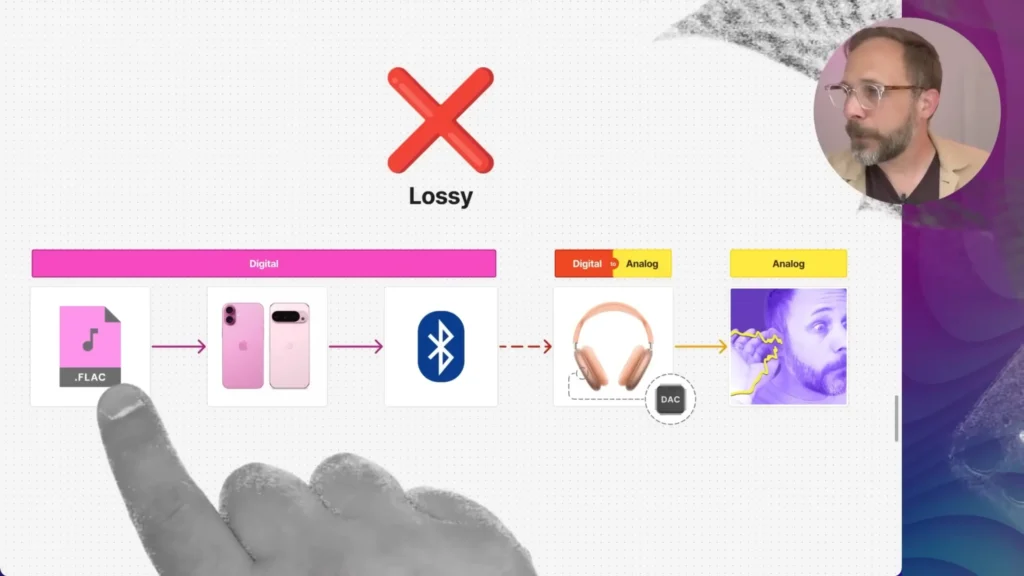
Bluetooth fails at step two. It just doesn’t have the bandwidth to send a lossless file through, so it recompresses the audio with a lossy codec before it reaches your headphones. By the time your AirPods Max get the signal, it’s no longer lossless.
If you want true lossless playback, you need a wired connection. Lossless tracks are available on Apple Music, Tidal, Amazon Music HD, Spotify, and Qobuz.
Sample Rate and Bit Depth: The Numbers Behind the Quality
You’ve already seen numbers like 16-bit/44.1 kHz and 24-bit/192 kHz floating around. Sample rate and bit depth define how detailed a digital audio file actually is.
Sample rate is how many times per second the audio gets measured. CD-quality audio samples 44,100 times per second (44.1 kHz). Hi-res audio can go up to 192,000 times per second (192 kHz). Think of it like frames per second in video — more samples mean a smoother, more accurate capture of the original sound wave.
Bit depth is how much detail each sample contains. A 16-bit sample can describe 65,536 possible volume levels. A 24-bit sample jumps to roughly 16.7 million. Higher bit depth means a wider dynamic range and a quieter noise floor — useful when you have very soft and very loud passages in the same track.
Here’s how the common formats stack up:
| Format | Sample Rate | Bit Depth | Where You’ll Find It |
|---|---|---|---|
| MP3 (320 kbps) | 44.1 kHz | N/A (compressed) | Older streaming, downloads |
| CD-quality lossless | 44.1 kHz | 16-bit | Apple Music Lossless, Tidal |
| Studio lossless | 48 kHz | 24-bit | Apple Music, professional video |
| Hi-Res lossless | 96–192 kHz | 24-bit | Apple Music Hi-Res, Qobuz |
A practical caveat: human hearing tops out around 20 kHz, and the math says 44.1 kHz is already enough to capture everything we can hear. The argument for higher sample rates is mostly about giving engineers more room during production, not about what you hear at playback. Bit depth has a clearer audible benefit, since it directly affects dynamic range, but most listeners won’t notice the jump from 16-bit to 24-bit on consumer gear.
Lossless vs. Lossy Audio
| Feature | Lossless | Lossy |
|---|---|---|
| Quality | Identical to the source | Some data permanently removed |
| File size | Roughly half a WAV | Roughly one-tenth of a WAV |
| Best for | Critical listening, archiving, and audiophiles | Streaming, mobile, casual listening |
| Example | FLAC, ALAC, WAV | MP3, AAC, OGG |
For the way most of us actually listen, like Spotify on the commute, Netflix on the couch, and podcasts during a workout, lossy audio gets the job done. Compressed audio is faster, cheaper, and more convenient, which is why almost everything you stream is compressed in some way.
Common Misconceptions About Lossless Audio
A lot of confusion floats around this topic. Here are the big ones to clear up.
❌ Myth: “My AirPods Max support lossless audio over Bluetooth.”
✅ Reality: No Bluetooth headphones currently support true lossless playback. The bandwidth limits force recompression. To get genuine lossless from AirPods Max, you need a wired USB-C to USB-C connection from your phone or laptop directly to the headphones.
❌ Myth: “Apple’s new USB-C to 3.5mm cable enables lossless audio.”
✅ Reality: That cable carries an analog signal on the 3.5mm end, then converts to digital on the USB-C end. The signal goes digital-to-analog-to-digital-to-analog before reaching your ears. That round trip is technically not lossless, and Apple says as much in the fine print.
❌ Myth: “If I switch to lossless, music will sound dramatically better.”
✅ Reality: Most listeners can’t reliably tell the difference between a high-bitrate MP3 (320 kbps) and a lossless file in a blind test. NPR has a free test online where you can try this yourself. The difference between a 128 kbps MP3 and a lossless file is usually audible. Between 320 kbps and lossless? Much harder.
Who Is Lossless Audio For?
| You should care about lossless if… | You probably don’t need lossless if… |
|---|---|
| You listen to wired, high-quality headphones | You stream over Bluetooth earbuds |
| You’re an active listener who picks apart mixes | You play music as background while working or driving |
| You have a quality DAC and amp in your chain | You haven’t checked whether your gear supports it |
| You’re archiving music for the long haul | You’re happy with how Spotify already sounds |
Marques Brownlee put it bluntly on the Lossless Audio Discussion by @Super* Review: most people can’t tell the difference between lossless and compressed audio in a blind test. The gap is real, but it’s smaller than the difference between two pairs of headphones, even smaller than the unit-to-unit variation between two headphones built in the same factory.
How to Record Lossless Audio
If you’re on the creator side of things, lossless matters at the recording end too. Plenty of modern USB microphones, including FIFINE mics, support 24-bit recording at 48 kHz or higher.
Here’s why those numbers actually matter when you’re the one capturing audio:
- 24-bit gives you headroom. When you record in 16-bit, your loudest peaks have to sit close to the ceiling, or you risk clipping. With 24-bit, you can record at safer, lower levels and still have plenty of detail to work with when you mix. That extra dynamic range is the single biggest practical reason creators record in 24-bit.
- 48 kHz is the video standard. If your audio will end up paired with video, recording at 48 kHz keeps things clean. Recording at 44.1 kHz requires a later sample rate conversion, which can introduce artifacts.
- Higher sample rates help with heavy editing. If you plan to time-stretch, pitch-shift, or apply lots of processing, recording at 96 kHz gives those algorithms more data to work with. For straight voice or music capture, 48 kHz is usually plenty.
Recording in WAV or FLAC at 24-bit, 48 kHz protects your work through every edit and export. A recording microphone that supports high-sample-rate recording is a smart starting point, whether a USB or XLR microphone.

How to Listen to Lossless Audio
If you want to actually hear lossless audio, not just pay for it, here’s how to set things up properly.
On iPhone and iPad
- Update to iOS or iPadOS 14.6 or later.
- Plug in wired headphones via the Lightning or USB-C adapter.
- Open Settings, scroll to Music, tap Audio Quality, and toggle Lossless Audio on.
- Choose between Lossless (up to 24-bit, 48 kHz) and Hi-Res Lossless (up to 24-bit, 192 kHz).
One thing to know: the DAC inside Apple’s Lightning-to-3.5mm adapter only supports up to 24-bit, 48 kHz. To play hi-res lossless properly, you’ll need a separate hi-res DAC from a brand like THX or iFi.
On Mac
- Update to macOS 11.4 Big Sur or later.
- Connect wired headphones to your Mac.
- Open the Apple Music app, go to Music > Settings > Playback.
- Under Audio Quality, toggle Lossless on and choose your streaming and download settings.
On Apple TV 4K
- Update to tvOS 14.6 or later.
- Connect to an AV receiver over HDMI.
- Go to Settings > Apps > Music > Audio Quality and toggle Lossless on.
Final Thoughts
Lossless audio is real, technically meaningful, and yes, genuinely better than lossy compression. But for most people, streaming over Bluetooth earbuds, paying extra for it, won’t change what reaches your ears.
If you’re a creator, the calculation flips. Recording in lossless protects your work through every edit and export. Ready to record at studio quality? Check out our guide to choosing the right USB microphone for high-resolution recording.
FAQ
Can I get lossless audio on AirPods Max?
Only with a wired USB-C to USB-C connection between your phone or laptop and the headphones. Over Bluetooth, the signal gets recompressed before it reaches the AirPods, so it’s no longer technically lossless.
Is FLAC better than MP3?
Technically, yes. FLAC preserves all the original audio data, while MP3 deletes some of it. Whether you’ll hear the difference depends on your gear, your ears, and how closely you’re listening.
Do I need a DAC for lossless audio?
Every digital audio device has a DAC inside it. For standard CD-quality lossless (16-bit, 44.1 kHz), the built-in DAC in your phone or laptop is fine. For hi-res lossless (24-bit at 96 kHz or 192 kHz), an external dongle DAC will give you a more accurate conversion.
What streaming services offer lossless?
Apple Music, Tidal, Amazon Music HD, Qobuz, and Deezer all offer lossless tiers. Spotify has been hinting at a lossless tier for years.
Do I need lossless audio to record professionally?
The recording side is where lossless really earns its keep. Recording in WAV or FLAC at 24-bit, 48 kHz or higher gives you the cleanest source files to edit and mix. A microphone that supports high-sample-rate recording is a smart starting point.
