

FIFINE AM8 vs. AM8PROT: Is the Upgrade Microphone Worth It?

FIFINE AM8 microphone is popular among many budget-friendly users with its plug-and-play, broadcast-quality sound, and simple yet sophisticated design. In 2026, FIFINE launches its updated version, AM8PROT. A successor that adds a chunky multi-function dial and a more advanced design.
That said, FIFINE AM8 vs AM8PROT, is this update worth it? Below, you’ll find a full breakdown of where each mic wins, where it falls short, and which one makes the most sense for your setup.
Quick Verdict on FIFINE AM8 vs AM8PROT
| Spec / Feature | FIFINE AM8 | FIFINE AM8PROT |
| Mic type | Dynamic | Dynamic |
| Bit depth | 16-bit | 24-bit |
| Headphone monitoring | 3.5 mm out | 3.5 mm out |
| Controls | Two dedicated knobs (gain + headphone volume) | Single multi-function dial (gain, headphone volume, game/chat mix) |
| Mute | Touch the button on the side panel | Touch area on top (labeled “Mute”) |
| RGB lighting | Basic color modes | Sound-reactive + expanded modes on mic and boom arm |
| Included stand | Desktop stand | RGB boom arm with desk clamp |
| Software support | None | FIFINE Genie (EQ, mixing, RGB sync) |
| Price (approx.) | ~$50 | ~$80 (kit with boom arm) |
FIFINE AM8 vs AM8PROT: Details Comparison Explore
Bit Depth: 16-Bit vs. 24-Bit
Winner: AM8PROT
The AM8 dynamic microphone records at 16-bit over USB — the longstanding industry standard. The AM8PROT bumps that to 24-bit, which gives you more dynamic range and a lower noise floor in your recordings.
For podcasters, streamers, and voiceover artists who want the cleanest possible capture, 24-bit is a welcome upgrade. @Brandon | Darkened Cyrus has a review on the AM8’s 16-bit, “Not that that’s a huge deal breaker, but in some ways, I wish that it were 24-bit”.
That said, YouTube, Twitch, Spotify, and Discord all process audio in ways that erase the difference between a 16-bit and 24-bit source. Your listeners won’t hear it in the final stream or upload.
Pro Tips:
Bit depth controls how many volume levels a mic’s analog-to-digital converter can distinguish. 16-bit gives you about 96 dB of dynamic range. 24-bit pushes that to around 144 dB.
24-bit gives you a better safety net while recording and editing. But once your audio hits a stream or compressed upload, the listener’s advantage over 16-bit is negligible. It’s a “nice to have,” not a dealbreaker.
Sound Quality (Out of the Box)
Winner: AM8
Here’s where things get interesting. Despite the spec bump, multiple hands-on tests found that the original AM8 delivers more presence and “has a little bit more presence in the bass”, according to @Brandon | Darkened Cyrus.
The AM8PROT microphone kit sounds flatter and slightly less punchy without any EQ applied. As you get a little bit closer to speaking to it, “it seems to be distorting”, Danny Lam @Lightning Audio & Tech thinks.
For the majority of creators who plug-and-play, the AM8 gives you a more ready-to-use sound without touching a single setting. The FIFINE AM8PROT can absolutely be tuned to sound great through Genie’s EQ controls, but if out-of-the-box performance is your priority, the AM8 takes this one.
Controls and Usability
Winner: AM8 for general use, AM8PROT for Gaming
The AM8 keeps things simple: two dedicated knobs (mic gain and headphone volume) plus a touch-capacitive mute button on the back. You know exactly what each does.
The AM8PROT replaces those two knobs with a single multi-function dial. You can turn the knob to adjust the mic gain, headphone volume, and game/chat mix. The LED shows which mode you’re adjusting, and the mute button with a subtle “Mute” label is sensitive to touch.

The all-to-one knob seems to look simpler. But you have to remember which mode you’re in. More than one tester admitted to hunting for it. That said, if you play games with separate audio and chat channels, the AM8PROT ‘s mix control is genuinely useful. For everyone else, the AM8’s straightforward layout wins on usability.
Connectivity
Winner: Tie (with an edge to AM8 for XLR-only users)
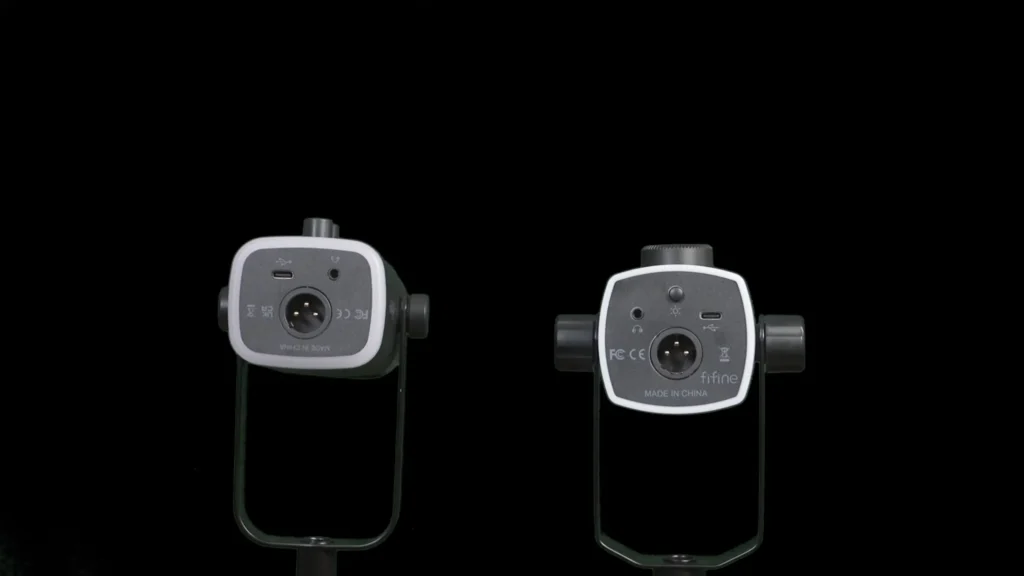
Both mics offer USB-C and XLR output. Both include 3.5 mm headphone monitoring. You can use USB and XLR simultaneously on the AM8PROT, which opens up dual-PC streaming setups — USB to your PlayStation or second computer, XLR to your main rig.
One important note: on both mics, XLR mode bypasses all digital features. That means no RGB, no headphone monitoring through the mic, no gain dial control, and no software support. If you plan to go XLR-only, the FIFINE USB/XLR AM8 microphone is the smarter buy since you’re paying extra for AM8PROT dynamic mic features you won’t use.
RGB and Aesthetics
Winner: AM8PROT
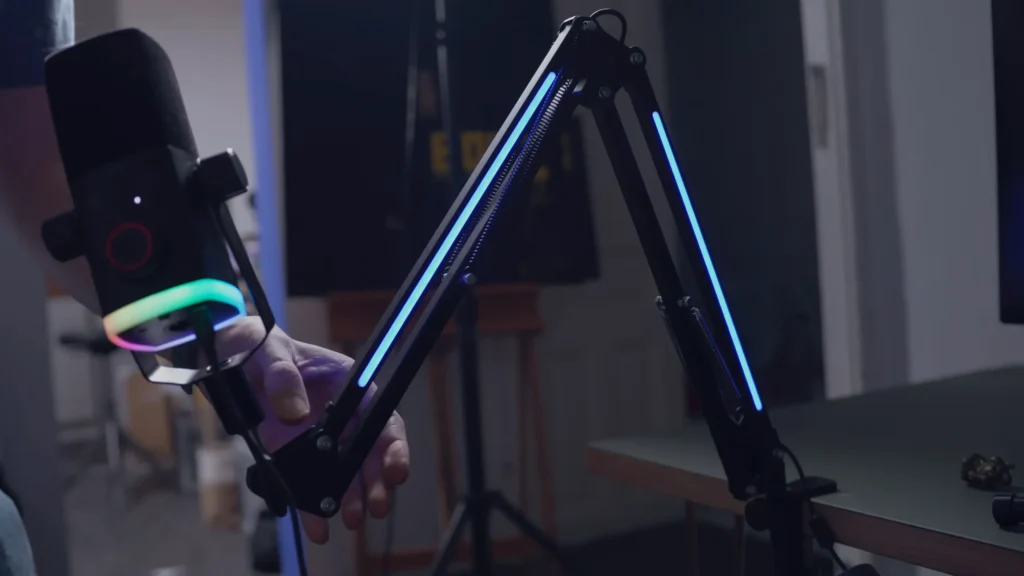
The AM8PROT takes RGB to a new level: sound-reactive lighting on the mic body, a full suite of color modes, and an RGB-equipped boom arm with its own set of lighting effects. You can synchronize them and reset the lighting modes in FIFINE Genie software, where you can apply preset effects (like a “Matrix” rain animation), or upload custom images to drive the color palette.

The AM8 has basic RGB lighting with a few color modes and the option to turn it off. So, if RGB matters to your setup, the FIFINE AM8PROT kit is in a different league.
Build Quality and Boom Arm
Winner: AM8PROT
Both mics have plastic bodies. The AM8PROT microphone feels slightly more substantial in hand — a touch heavier and sturdier. Its yoke tightening controls are larger and easier to grip than the originals.
The AM8PROT’s included boom arm is the type with exposed springs — it’s not a premium product, and it doesn’t offer cable management. But users noted it feels more solid than the typical budget arm. @Barry Watson thought “it could handle a relatively heavy microphone,” and the RGB lighting is “a really high value package”.

The AM8 ships with a small desktop stand instead. Functional, but most creators will upgrade to a boom arm eventually anyway.
Software Support
Winner: AM8PROT
The AM8 has no companion software, but the AM8PROT works with FIFINE Genie software, a Windows application that acts as both an RGB controller and audio control panel. Genie lets you adjust EQ, mix audio sources, synchronize lighting across multiple FIFINE devices, and apply preset or custom lighting effects.
For a first-generation application, Genie is surprisingly stable. It runs smoothly, doesn’t crash, and the RGB synchronization feature — where you position devices on a virtual color wheel — is well designed. If you own multiple FIFINE products, Genie ties everything together in a way that competing software from bigger brands doesn’t always manage.

Price and Value
Winner: AM8 for sound per dollar, AM8PROT for kit value
The AM8 typically runs around $50. The AM8PROT kit (with boom arm) comes in around $80, though sale pricing can bring it lower. That $30 difference gets you the boom arm, 24-bit audio, game/chat mix, and full RGB.
But if you’re buying purely for sound and don’t care about the extras, the AM8 remains one of the strongest price-to-performance ratios in the budget mic market.
FIFINE AM8 vs AM8PROT: How to Pick?
Specs only tell part of the story. The right mic depends on who you are and how you plan to use it. Here’s a quick-reference table, followed by a closer look at the reasoning.
| You Are… | You Need… | Best Pick | Why |
|---|---|---|---|
| Plug-and-play podcaster or streamer | Great sound, zero fuss | AM8 | Warmer, more present tone out of the box — no EQ tweaking required. |
| Gamers who live in Discord | Game/chat audio balance | AM8PROT | The game/chat mix dial lets you balance gameplay sound against voice chat in real time. Headphone monitoring makes it a self-contained audio hub. |
| RGB enthusiast building a setup | Synchronized desk lighting | AM8PROT | Sound-reactive mic lighting plus an RGB boom arm, all synchronized through FIFINE Genie. The AM8 has basic RGB, but the AM8PROT is in a different league visually. |
| Budget home studio creator (XLR) | Raw recording quality | AM8 | XLR mode bypasses all digital features on both mics. The AM8 delivers a stronger tonal character and costs $30 less. |
| First-time creator wanting a full kit | One box, everything included | AM8PROT | Mic, boom arm, USB cable, desk clamp — all for ~$80. The most complete starter package with room to grow via Genie software. |
If you’re a streamer or podcaster who values plug-and-go simplicity, the FIFINE AM8’s out-of-the-box sound advantage is the deciding factor — it sounds polished without touching a single setting. On the other hand, gamers get genuine utility from the AM8PROT’s mix control, which solves a real pain point that software mixers handle less elegantly.
Final Words on FIFINE AM8 vs AM8PROT
The FIFINE AM8 is still the mic to beat for pure sound quality. It delivers more presence, more bass, and a more polished out-of-the-box tone than the AM8PROT. The FIFINE AM8PROT makes sense if you want the full package. This feature-rich kit includes an RGB boom arm, 24-bit audio, game/chat mix control, and FIFINE Genie software support.
FIFINE AM8 vs AM8PROT? It depends on your needs. If you’re open to other FIFINE options, the K688 at a similar price point remains a strong alternative worth considering.
FAQs
Does the AM8PROT sound better than the AM8?
Not out of the box. The AM8 has more bass presence and a fuller tone without any EQ adjustments. The AM8PROT sounds flatter by comparison, though you can shape it with FIFINE’s Genie software.
Do the RGB features work in XLR mode?
No. Both mics lose all digital features (RGB, headphone monitoring, dial controls) when connected via XLR only.
Is the included boom arm any good?
It’s a budget arm with exposed springs and no cable management, but it’s sturdier than most arms at this price. It holds the mic securely, and the RGB lighting adds a nice visual touch.
What is the FIFINE Genie software?
Genie is FIFINE’s Windows desktop software for controlling compatible devices. It offers EQ adjustment, audio mixing, and RGB synchronization across multiple FIFINE products.
Tips: FIFINE Genie only supports FIFINE AM8PROT, SC8, H13, BM38, and H19 now.
Which mic should I buy if I only care about sound quality?
FIFINE AM8. At around $50, it offers one of the best out-of-the-box sounds in the budget dynamic mic category.
