

FIFINE H6 vs H9 vs H13: Which Budget Gaming Headset Actually Wins?

FIFINE’s H6, H9, and H13 headsets all promise to elevate your gaming experience without emptying your wallet. They share a family resemblance—50mm drivers, 7.1 virtual surround sound, detachable microphones, and braided cables—but the differences between them matter more than their spec sheets suggest.
So, FIFINE H6 vs H9 vs H13? The comparison is all about the details, which breaks down exactly where each headset excels and falls short, so you can make a decision based on your specific gaming setup and priorities rather than assumptions about model numbers.
Head-to-Head Comparison
FIFINE H6 Headset
Best For: Gamers who chat frequently and want balanced performance
Price: About $40
Overall: 4.5/5
| Category | Score |
| Microphone Quality | ★★★★★ |
| Audio Quality | ★★★★☆ |
| Comfort | ★★★★★ |
| Build Quality | ★★★★☆ |
| Features | ★★★★☆ |
| Value | ★★★★★ |
FIFINE H9 Headset
Best For: Multi-platform gamers who need analog and USB connectivity
Price: About $38
Overall: 4/5
| Category | Score |
| Microphone Quality | ★★★☆☆ |
| Audio Quality | ★★★★★ |
| Comfort | ★★★☆☆ |
| Build Quality | ★★★★☆ |
| Features | ★★★★☆ |
| Value | ★★★★☆ |
FIFINE H13 Headset
Best For: Users who want premium features, RGB, and best-in-class audio
Price: About $50
Overall: 4.5/5
| Category | Score |
| Microphone Quality | ★★★★☆ |
| Audio Quality | ★★★★★ |
| Comfort | ★★★★★ |
| Build Quality | ★★★★★ |
| Features | ★★★★★ |
| Value | ★★★★☆ |
FIFINE H6 vs H9 vs H13: Build Quality and Design
Materials and Construction
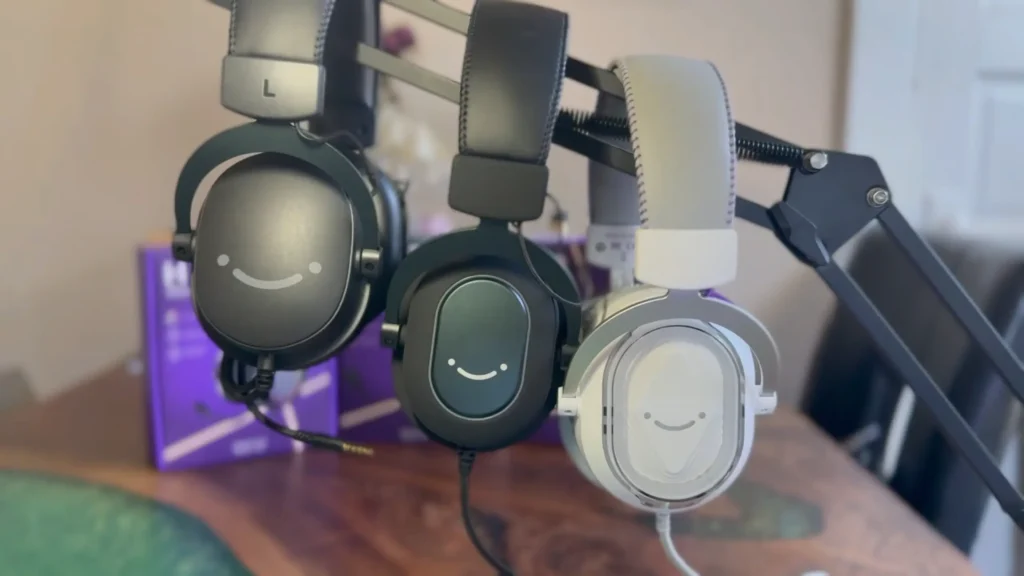
All three headsets share a similar construction philosophy: adjustable headbands with leather-like padding, plush ear cushions, and braided cables. But the execution varies.
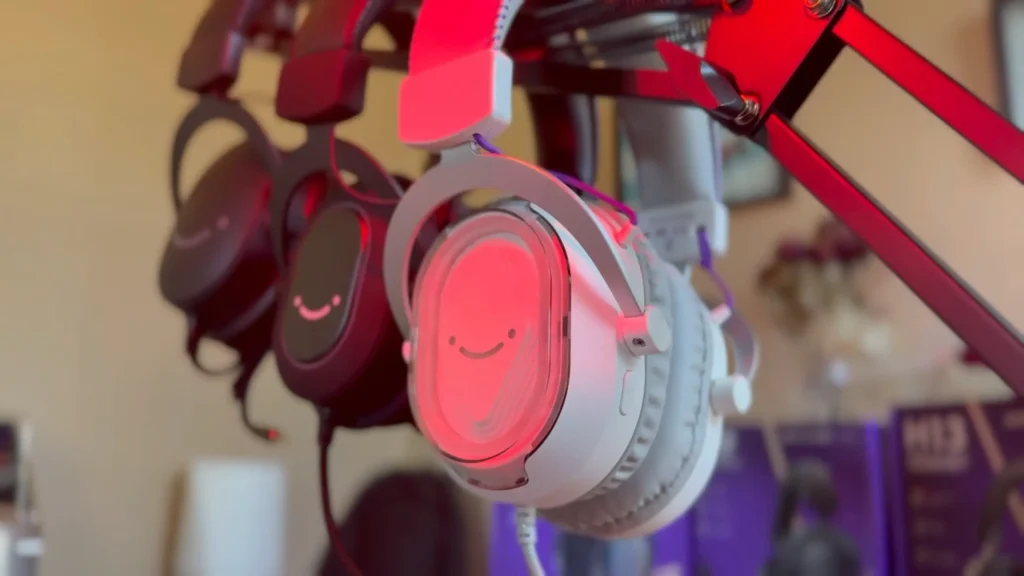
- The H6 delivers a surprisingly solid build for its price point. The materials feel sturdy without being heavy, and the ear cushions provide genuine comfort during extended sessions. It features subtle RGB lighting on the ear cups that cycles through colors automatically, but you can’t customize the RGB pattern.
- The H9 takes the minimalist route. No RGB, no flashy design elements—just a clean, understated black aesthetic. This headset feels noticeably lighter than its siblings, which sounds like a positive until you realize that lighter construction often means less secure clamping pressure.
- The H13 wins the looks contest handily. It’s designed with contrasting color accents on the ear cup supports, more substantial construction, and the most impressive RGB implementation. The lighting shines through a clear covering on the ear cups, creating a polished visual effect.
Cable Design
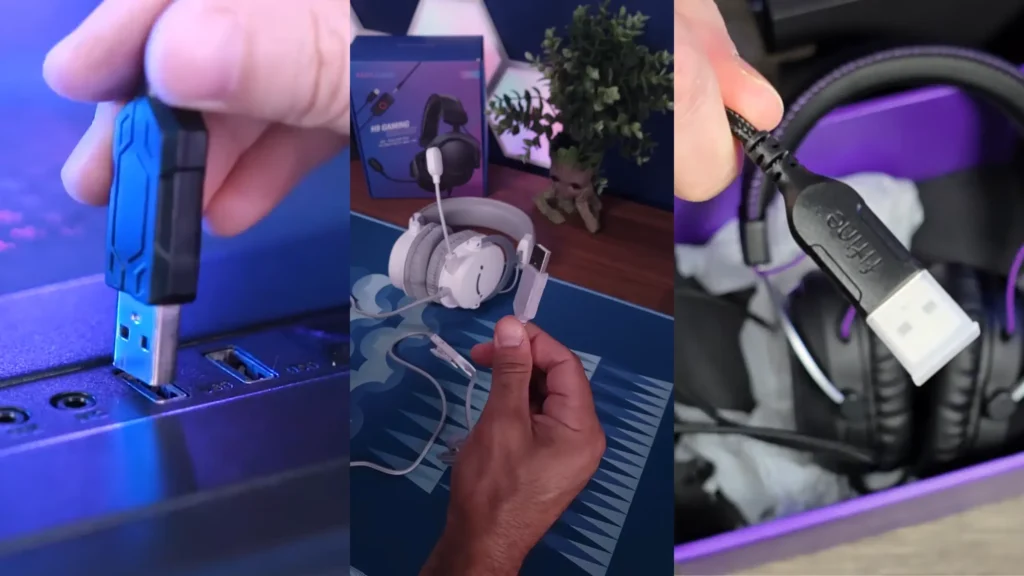
These three FIFINE headsets use braided cables that feel durable and resist tangling.
- The H13 comes with an exceptionally long USB-A cable (7.55ft)—useful if your PC sits farther from your gaming position.
- The H9 offers 3.5mm and a USB detachable cable. With a 10ft total length, it’s ideal for desk setups where you’re editing or working close to your machine.
- The H6 offers a USB cable with adequate length(6.6 ft) for most standard gaming setups.
Winner: FIFINE H13 headset for premium aesthetics and build quality, though the H6 punches well above its weight class in construction quality.
FIFINE H6 vs H9 vs H13: Audio Performance
Driver Quality and Sound Signature
All three headsets pack 50mm drivers, which typically deliver fuller bass response compared to smaller driver configurations. The sound signature across the lineup leans toward balanced rather than bass-heavy, which works well for gaming, where positional audio matters more than thumping bass drops.
The H6 produces the most “balanced” sound of the three, as YouTuber Barry Watson reviewed. It handles music, movies, and games competently without overemphasizing any frequency range. The EQ modes (gaming, music, and movies) make a noticeable difference, helping compensate for a slightly flat default sound profile.
“My impression is that the H6 actually has the most balanced sound of the bunch, followed by the H13. So the H6 and the H13, I think, sound pretty good. And for that matter, the H9 is also not bad at all. And the differences between these three I would characterize as relatively minor in terms of the earphone sound quality.”
Barry Watson on YouTube
The H9 headset surprises with arguably the best out-of-the-box audio quality in the lineup. Several testers noted they didn’t miss the EQ modes because the H9 sounds great without adjustment. The audio presentation has more depth and clarity compared to the H6’s default settings, making it particularly enjoyable for music listening and immersive single-player games.
“If you have a console like an Xbox, uh, the Nintendo Switch, or anything like that, I highly recommend the H9 for that case. Because that way you only need one headset for everything, because I mean, that’s just how it is.”
TechWithTJ on YouTube
The H13 delivers the warmest bass response and what testers describe as a “grade up” in overall clarity. The highs hit cleanly, the lows rumble appropriately, and the mid-range stays present without getting muddy.
“It hits that frequency level that makes me smile when I’m vibing, when I’m editing music.”
Fired Chicken on YouTube
7.1 Virtual Surround Sound
All three models feature 7.1 virtual surround sound that you can toggle on or off. The implementation works well for identifying directional audio cues in competitive games—footsteps behind you, gunfire from the left, teammate callouts from various positions.
The spatial audio feature proves particularly useful in games where sound positioning matters. YouTuber Fired Chicken specifically mentioned using the H6’s surround feature in Star Citizen to track players sneaking up from behind. The technology isn’t revolutionary, but it functions as advertised and adds genuine value for competitive gaming.
EQ Options
- The H6 offers three EQ presets (gaming, movies, music) accessible via the inline controller. The settings make a genuine difference.
- The H9 skips EQ entirely, banking on its strong default tuning. This simplicity works in its favor if you prefer a plug-and-play experience without fiddling with settings.
- The H13 provides the most comprehensive audio control with four EQ presets plus a chat/game balance slider. The slider lets you prioritize voice chat or game audio on the fly.
Winner: H13 for features and raw quality, with the H9 earning honorable mention for best default audio performance.
FIFINE Headset Comparison: Built-in Mic Quality
When it comes to the built-in mic on FIFINE H6 vs H9 vs H13, the results surprise us. It’s where the model number hierarchy completely breaks down.
Raw Recording Quality
The H6 microphone significantly outperforms both the H9 and H13. Multiple independent reviewers confirmed this unexpected finding. The H6’s mic produces clearer, more articulate vocals with less of the muffled quality that plagues many headset microphones.
Fired Chicken described the H6’s microphone as “miles ahead” of the H9, calling the difference “night and day.” H6’s mic sounds good enough for Discord gaming sessions without any post-processing, while the H9 and H13 mics require more work to sound acceptable.
The H9 features the weakest microphone performance in the lineup. The audio quality works for casual voice chat, but Fire Chicken universally noted it as the headset’s biggest drawback. If you plan to stream, create content, or simply want your squadmates to hear you clearly, “throw the mic away and use the headset, and you’ll have an awesome time”.
The H13 includes a noise cancellation feature that helps reduce background noise, but the raw vocal quality still falls short of the H6. The muffled sound persists regardless of mic positioning or gain adjustments. This is particularly frustrating given the H13’s premium positioning and price point.
Practical Recommendations
For any scenario where voice quality matters—team chat, Discord servers, streaming, content creation, video calls, teleconferencing—the H6 stands alone as the clear choice. If you choose the H9 or H13, consider pairing them with a standalone condenser microphone for voice communication and using the headset purely for audio monitoring.
Winner: H6 by a significant margin. This single category might determine which headset makes sense for your use case.
Comfort & Fit Comparison: FIFINE H6 vs H9 vs H13?
Comfort testing reveals clear differences between the three models, though individual head shapes and sizes will influence personal experiences.
Clamping Pressure and Seal
- The H6 hits a sweet spot with secure clamping that feels “square” against the head without excessive pressure. The ear pads rest comfortably with a good seal around the ears, blocking outside noise effectively. Multiple reviewers gave high marks for the H6’s comfort during extended gaming sessions.
- The H9 feels lighter but less secure. Barry Watson noted that no matter how they adjusted the headband, they couldn’t achieve the same planted feel as the H6. The clamping pressure concentrates near the top of the ear cups rather than distributing evenly, creating a “hanging” sensation that becomes noticeable over time.
- The H13 matches the H6 for comfort quality, with testers noting its effectiveness at blocking outside noise. The thicker ear pads provide excellent cushioning. However, Bary Waston also noticed that the slightly heavier build creates a subtle “weight hanging on your head” sensation.
Glasses Compatibility
For glasses wearers, this matters. Two reviewers specifically mentioned wearing glasses during testing. The H6 and H13 both received positive marks for not pressing frames uncomfortably against the skull. The H13’s thicker pads particularly impressed YouTuber Dad Tech noted that many headphones cause discomfort by pressing glasses against their head.
Long Session Viability
All three headsets can handle multi-hour gaming sessions, but the H6 and H13 pull ahead for marathon gaming. YouTuber TechWithTJ confidently stated they could wear the FIFINE H13 headset “for a full four hours or however long you game” without issues. The H9 works fine for moderate sessions but may cause fatigue faster due to its less optimal fit characteristics.
Winner: H6 edges out the H13 for overall comfort, though the H13 wins for glasses wearers and noise isolation.
FIFINE H6 vs H9 vs H13: Features & Connectivity
Connection Options
This category reveals the H9’s secret weapon.
The H6 uses USB-A only. Simple, straightforward, plug-and-play. Works with PC and PlayStation consoles that support USB audio. For smartphone use, you’ll need a USB-A to USB-C adapter (not included).
The H9 offers the most flexible connectivity in the lineup. The headset connects to a USB hub/controller with the standard USB-A connection, but here’s the key feature: you can disconnect the headset from the controller and plug it directly into any device with a 3.5mm audio jack using the included TRRS connector.
So, you’ll enjoy the native compatibility with Xbox, Nintendo Switch, smartphones with headphone jacks, and any other device with standard audio output.
The H13 returns to USB-A only connectivity, limiting it to PC and PlayStation. No analog fallback option exists.
Controller Features
- The H6 controller includes volume up/down, EQ mode cycling, 7.1 surround toggle, and a mute switch. No microphone volume control—the mic level stays fixed at whatever your recording device sets.
- The H9 adds separate controls for headphone volume and microphone volume, plus the 7.1 toggle and mute switch. The controller includes a shirt clip for convenient positioning during use. The detachable design gives it unique versatility.
- The H13 packs the most controls: four EQ presets, 7.1 surround toggle, voice isolation mode for the microphone, a chat/game balance slider, volume rocker, and mute button. The chat/game mixer proves particularly useful for multiplayer gaming, where you need to balance teammate communication with game audio.
RGB and Customization
- The H6 features automatic RGB cycling. You cannot customize or disable.
- The H9 has no RGB.
- The H13 offers customizable solid-color RGB. You can adjust to match your setup.
Winner: H9 for connectivity versatility, H13 for feature depth.
FIFINE H6 vs H9 vs H13: Value Comparison
All these FIFINE gaming headsets compete in the budget gaming headset category, making value assessment straightforward: you’re getting solid performance without premium pricing across the board.
The H6 delivers the best overall value proposition. You get the best microphone in the lineup, a comfortable fit, functional RGB, EQ options, and 7.1 surround sound. For users who frequently use voice chat, the H6’s superior mic quality alone justifies the purchase over the alternatives.
The H9 represents the best value for multi-platform gamers. The analog connectivity option means one headset works with everything—PC, PlayStation, Xbox, Switch, and mobile devices with headphone jacks. If you game across multiple platforms and don’t want separate headsets for each, the H9 solves that problem elegantly.
The H13 costs more but delivers premium build quality, the best audio, advanced features, and impressive aesthetics. For users who prioritize audio fidelity and don’t mind using a separate microphone for communication, the H13 justifies its higher price point.
When FIFINE H6, H9, and H13 Headset Wins
| Best Pick | Scenario |
|---|---|
| H6 | Ranked competitive gaming with callouts Discord with friends Work-from-home video calls Budget-conscious first gaming headset |
| H9 | Couch gaming on a console Xbox or Switch gaming Multi-platform household Minimalist desk aesthetic |
| H13 | Marathon single-player sessions Music listening and editing Streaming with a separate mic Glasses-wearer comfort priority |
All in all, the FIFINE H6 headset is your pick if you want better communication with your teammates. It’s built for clear comms in competitive lobbies and Zoom calls alike. The H9 suits multi-platform gamers who refuse to buy separate headsets for every console. The H13? That’s for the audio-obsessed who want their headset to sound and look premium—just don’t rely on its mic for anything serious.
Final Verdict on FIFINE H6 VS H9 VS H13
FIFINE H6 vs H9 vs H13: which one should you choose? The H6 is the best overall headset; the FIFINE H9 headset is the best for multi-platform gaming, and the FIFINE H13 headset is the best premium option. All three punch above their weight class for budget headsets. Your priority—mic quality, connectivity, or audio fidelity—determines your winner.
FAQ
1. Which headset has the best microphone for streaming?
The H6, without question. If you plan to stream seriously, you’ll eventually want a dedicated microphone regardless, but among these three, the H6’s mic sounds noticeably clearer and more professional.
2. Are these headsets wireless?
No. All three models use wired connections only. The cables are braided and generously long, but if wireless is a requirement, you’ll need to look elsewhere.
3. Do the EQ modes actually make a difference?
Yes. Multiple reviewers specifically noted that the EQ presets (available on the H6 and H13) produce audible differences in sound profile. The gaming mode enhances positional audio, the music mode balances frequencies for listening enjoyment, and the movie mode adjusts for dialogue clarity.
4. Which headset works with Xbox?
Only the H9 offers native Xbox compatibility through its 3.5mm analog connection that plugs directly into the Xbox controller. The H6 and H13 use USB-A only, which Xbox consoles don’t support for headset audio.
5. Do I need to install software to use these headsets?
No. All three headsets work plug-and-play with no software required. All controls operate through the inline controller box. If you want the improved adjustment on FIFINE H13, you can download the FIFINE Genie software to do it.
