
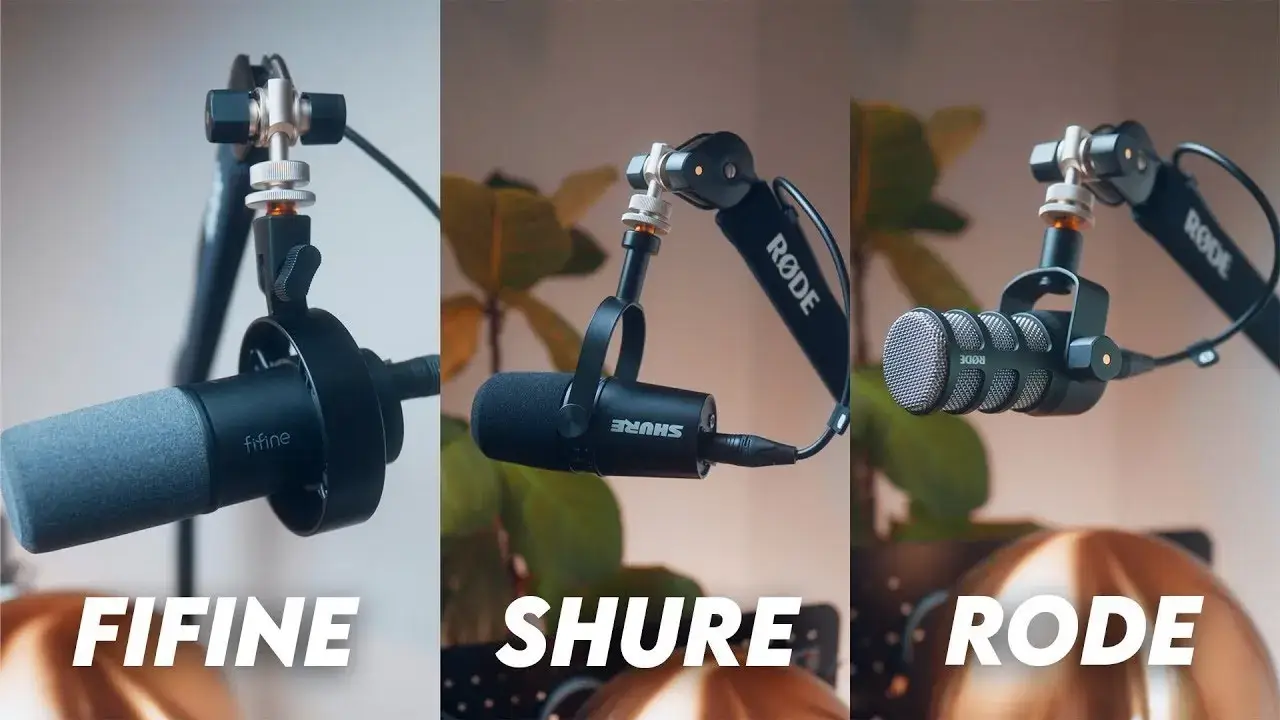
Best Microphones for Beginners: Top 5 Picks for Podcasters, Streamers, and YouTubers

Picking your first microphone feels overwhelming. Trust me, we’ve all been there—scrolling through endless Amazon listings, watching comparison videos, and second-guessing every option. Here’s the reality: you don’t need to spend hundreds of dollars to sound professional.
In this guide, we’ll break down the five best microphones for beginners. After hands-on testing for sound quality, noise rejection, and build quality, etc, we’ve found that these beginner-friendly whether you’re starting a podcast, launching a Twitch stream, or creating your first YouTube video.
Top 5 Best Microphones for Beginners at a Glance
1. FIFINE K688 – Best Overall for Beginners
2. Shure MV7 – Best for Versatility
3. Rode PodMic – Best Build Quality for the Price
4. FIFINE A6T – Best Budget Bundle
5. FIFINE K669 – Best Ultra-Budget Option for Entry-Level
Detailed Preview of the 5 Best Microphones for Beginners
1. FIFINE K688
| Category | Score |
| Sound Quality | 9/10 |
| Build Quality | 8/10 |
| Ease of Use | 9/10 |
| Background Noise Rejection | 7/10 |
| Value for Money | 10/10 |
| Overall | 9.2/10 |
Pros:
- Warm, rich sound that compares favorably to the Shure SM7B
- Both USB-C and XLR connectivity are built in
- Live headphone monitoring with a dedicated volume knob
- Gain control directly on the microphone
- The included shock mount adds professional value
- The simple aesthetic looks sharp on camera
Cons:
- USB connection introduces some background hiss at higher gain levels
- The boom arm mount feels slightly plasticky
- Requires close mic technique for best results
- Background noise rejection isn’t as strong as pricier competitors
The FIFINE K688 is the most affordable dual-connectivity mic in this comparison, and it sounds impressively good. Build quality matches the price, with lighter materials, but feels durable enough for regular use.
Sonically, it delivers a warm, full sound with strong low-end. Via XLR, it needs minimal EQ to sound broadcast-ready. USB introduces some hiss at high gain, but close mic placement and moderate gain still produce clean, professional results.
There’s an expected function that you may want as a beginner: the built-in headphone jack with volume control. Hearing yourself in real-time helps you maintain consistent mic distance and catch problems before they ruin a recording.
Who should buy it: Streamers, podcasters, and YouTubers who want the best sound quality per dollar spent and don’t mind sitting close to their mic.
2. Shure MV7
| Category | Score |
| Sound Quality | 9/10 |
| Build Quality | 9/10 |
| Ease of Use | 10/10 |
| Background Noise Rejection | 10/10 |
| Value for Money | 8/10 |
| Overall | 9.0/10 |
Pros:
- Best-in-class background noise rejection
- USB and XLR dual connectivity
- ShurePlus MOTIV app with customizable EQ presets
- Reliable performance across different recording environments
- Solid metal construction
- Removable pop filter
Cons:
- Significantly more expensive at $179-270
- The form factor feels smaller than expected for the price
- Slightly mid-range heavy sound out of the box
- Not as warm as the K688 or PodMic
How do you make a professional-grade microphone accessible to beginners? The Shure MV7 is the answer.
During our testing, we recorded with active construction outside. The MV7 largely ignored it, while the K688 picked up noticeable noise, and even the Rode PodMic let some through. This strong noise rejection makes the MV7 ideal for apartments, home offices, or any space without guaranteed quiet.
Via USB with the “natural” preset, the sound is slightly mid-forward and can feel a bit muffled compared to the K688. Through XLR, it opens up and sounds more balanced. Also, the ShurePlus MOTIV app makes tuning easy, eliminating the need for external software.
Who should buy it: Podcasters who interview guests in various locations, creators who can’t guarantee quiet recording spaces, and anyone who values “set it and forget it” reliability.
3. Rode PodMic
| Category | Score |
| Sound Quality | 9/10 |
| Build Quality | 10/10 |
| Ease of Use | 7/10 |
| Background Noise Rejection | 8/10 |
| Value for Money | 9/10 |
| Overall | 8.8/10 |
Pros:
- Exceptional build quality—almost entirely metal construction
- Rich, broadcast-quality sound with proper EQ
- Will easily last 5-10 years of daily use
- Classic design that looks great on camera
- Built-in pop filter
- Excellent value at $100
Cons:
- XLR-only—requires audio interface (additional cost)
- Needs more EQ work than competitors out of the box
- Heavier than other options
- Steeper learning curve for complete beginners
Pick up the PodMic, and you immediately understand where your money went. Almost every component is metal, with only the tightening knobs using (high-quality) plastic. The integrated pop filter means one less thing to buy and position. No “gaming accessory”, this mic is about a “professional tool”.
Sound-wise, the PodMic requires more post-processing than the K688 or MV7. Out of the box, it sounds a bit mid-heavy and muffled. But here’s the thing: once you dial in your EQ settings (or use a preset designed for it), the PodMic sounds absolutely fantastic. Warm, punchy, and broadcast-ready.
The XLR-only connectivity is both a limitation and an advantage. You’ll need an audio interface like the Focusrite Scarlett or Rode AI-1, adding $100+ to your total investment. However, that interface opens up a world of audio possibilities and will serve you for years as you upgrade other equipment.
Who should buy it: YouTubers who want the best long-term investment, anyone building a semi-pro or professional setup, and creators who already own (or plan to buy) an audio interface.
4. FIFINE A6T
| Category | Score |
| Sound Quality | 8/10 |
| Build Quality | 7/10 |
| Ease of Use | 9/10 |
| Background Noise Rejection | 8/10 |
| Value for Money | 10/10 |
| Overall | 8.5/10 |
Pros:
- Complete starter kit with boom arm, pop filter, and 8-foot USB-C cable
- RGB lighting with automatic mute indication
- Strong background noise rejection for a condenser mic
- Easy tap-to-mute on top of the mic
- $50 for the entire bundle
Cons:
- The boom arm is compact—may not reach across larger desks without modification
- No control over RGB colors or the ability to turn them off without muting
- Lightweight build (expected at this price)
- Spring tension may need adjustment for optimal positioning
“Can I get everything I need for under $75?” FIFINE A6T is the answer. The mic is a USB-C condenser with a bottom gain knob and tap-to-mute on top. The RGB cycles through eight presets and can’t be adjusted or disabled unless muted, though muting turns the lights off entirely for clear visual feedback.
Sound quality impressed us for the price. Raw audio includes typical background noise, but with light compression, limiting, and a noise gate, the A6T delivers clean, stream-ready sound. In side-by-side tests, it clearly outperformed a $10 lav mic.
The boom arm is the weak point. It’s shorter than expected and may not reach larger desks, though removing one tension spring helped extend and stabilize it.
Who should buy it: Complete beginners with tight budgets, streamers who need an all-in-one solution, and anyone who wants to start recording today without researching compatible accessories.
5. FIFINE K669
| Category | Score |
| Sound Quality | 7/10 |
| Build Quality | 6/10 |
| Ease of Use | 10/10 |
| Background Noise Rejection | 6/10 |
| Value for Money | 10/10 |
| Overall | 8/10 |
Pros:
- Extremely affordable at $35
- USB plug-and-play simplicity
- Built-in volume adjustment
- Natural condenser sound
- Works with smartphones (via adapter), tablets, and computers
- Perfect for testing the waters without financial commitment
Cons:
- Condenser design picks up more background noise
- Needs close positioning for best results
- Basic build quality
- No XLR option for future upgrading
Here’s what nobody tells beginners: expensive gear won’t make your content good, and cheap gear won’t make it bad. This $35 FIFINE K699 proves that point perfectly.
The setup couldn’t be simpler. Plug the USB cable, and you’re recording. The built-in volume knob lets you adjust levels on the fly. The flip side? Condensers are more sensitive and pick up more room noise than dynamic mics. Position it close to your mouth (within 6 inches), and you’ll minimize this issue.
One content creator shot an entire video podcast episode with an iPhone 11 Pro and this FIFINE K699. Audio and video that looked and sounded incredibly professional.
Who should buy it: Absolute beginners who want to test content creation before a serious investment, budget-conscious podcasters, and anyone who needs a functional secondary mic.
What to Look for in a Beginner Microphone
Connection Type (USB vs. XLR)
This is your first decision, and it affects everything else.
- USB microphones like K688 K688, A6T, K699, and Shure MV7 plug directly into your computer, tablet, or smartphone. They’re ideal for beginners because there’s nothing else to buy.
- XLR microphones like Rode PodMic, FIFINE K688, and Shure MV7 require an audio interface (a separate piece of hardware that converts the analog signal to digital). This adds cost and complexity but offers better audio quality and more flexibility.
Our recommendation: Start with USB. If you later decide to invest in an audio interface, mics with dual connectivity (like the K688 or MV7) let you upgrade without replacing your microphone.
Dynamic vs. Condenser
These terms describe how microphones capture sound, and each type has distinct characteristics.
- Dynamic microphones (like the Rode PodMic, K688, and MV7) are less sensitive to ambient noise and more forgiving of imperfect recording environments. The closer you speak, the more punchy “broadcast” sound you’ll get.
- Condenser microphones (like the A6T and K699) capture more detail and sound more natural. They pick up more background noise and room reflections, so they work best in treated or quiet spaces.
Your choice: If you’re beginners without acoustically treated rooms, pick up dynamic mics.
Background Noise Rejection
How well does the mic ignore sounds you don’t want? This matters enormously if you’re recording in:
- Apartments with neighbor noise
- Home offices with HVAC systems
- Rooms near traffic or construction
- Spaces with computer fans or other electronics
The Shure MV7 excels here. The K688 and PodMic perform adequately. The condenser options (A6T and K699) require more careful environment management.
Build Quality and Longevity
The Rode PodMic leads this category—it’s built to last a decade of daily use. The MV7 and K688 feel solid and should serve you for years. The budget options (A6T and entry-level FIFINE) use lighter materials but shouldn’t cause reliability concerns under normal use.
Ease of Use
How quickly can you go from unboxing to recording? Consider:
- Setup complexity – USB mics win here
- Software requirements – Some mics (like the MV7) have companion apps; others work without any software
- Controls – On-mic gain and volume knobs simplify workflow
- Monitoring – A headphone jack for real-time audio monitoring helps maintain consistency
Final Thought: Pick Up Your Beginning Mics
The FIFINE K688 earns our top recommendation for beginners. At $70 with dual USB/XLR connectivity, professional-grade sound, and essential features like headphone monitoring, it’s the mic most beginners should buy.
That said, different situations call for different solutions:
- Unpredictable recording environments? The Shure MV7’s superior noise rejection is worth the premium.
- Planning to build a semi-pro setup? The Rode PodMic offers unmatched durability and grows with you.
- Need everything in one box for under $50? The FIFINE A6T bundle eliminates shopping paralysis.
- Just want to start recording today for minimal investment? The $35 FIFINE USB mic proves that great content doesn’t require expensive gear.
The best microphone for beginners is the one that gets you creating. Don’t let gear research become procrastination. Simply choose a microphone that suits your budget and begin recording. You will find the best mic for you after trial and error.
FAQs
What’s the difference between USB and XLR microphones?
USB microphones contain a built-in audio interface and connect directly to computers, tablets, and smartphones. XLR microphones use an analog connection and require a separate audio interface. USB is simpler for beginners; XLR offers more flexibility and typically better audio quality for professional setups.
Do I need an audio interface for these microphones?
Only for the Rode PodMic, which is XLR-only. The FIFINE K688 and Shure MV7 work via USB without any additional equipment. The A6T and K699 are USB-only and plug directly into your devices.
Is a condenser or a dynamic microphone better for beginners?
Dynamic microphones are generally more forgiving for beginners. They’re less sensitive to room noise, computer fans, and imperfect recording environments. Condenser mics sound great in treated spaces but can be challenging in untreated rooms.
Which microphone is best for streaming on Twitch?
The FIFINE K688 is our top streaming pick. It offers great sound quality, stays at a fixed desk position (where it performs best), and the price leaves budget for other streaming gear. The A6T bundle is also excellent for streamers starting from scratch.
Which microphone is best for podcasting?
For solo podcasters, the K688 delivers excellent value. For podcasters who interview guests in various locations or can’t guarantee quiet recording spaces, the Shure MV7’s background noise rejection makes it worth the premium.
Can I upgrade from USB to XLR later with these microphones?
Both the K688 and MV7 have XLR outputs alongside USB. When you’re ready to invest in an audio interface, simply switch connection methods without replacing your mic. The Rode PodMic is XLR-only from the start, while the A6T and K699 are USB-only with no upgrade path.
