
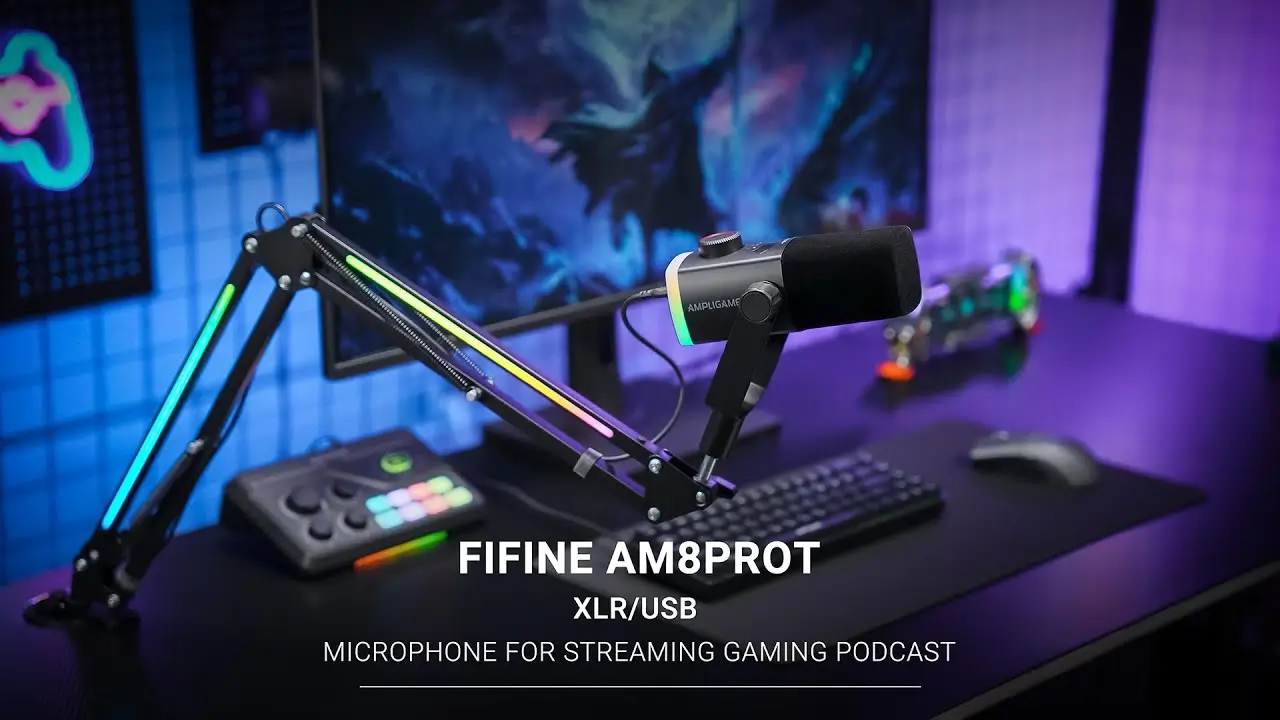
FIFINE AM8PROT Microphone Kit Review: Is it Really Worth Your Money in 2026?

In FIFINE, the bestseller AM8 mic became a fan favorite among streamers, podcasters, and content creators. Now, FIFINE is back with the AM8PROT—a full streaming microphone kit that bundles an upgraded mic with an RGB-equipped boom arm.
At around $90, the AM8PROT positions itself as a complete solution for creators who want professional-grade features without the professional-grade price tag. But does it actually deliver? We dug into FIFINE AM8PROT review and real-world tests to find out whether this kit deserves a spot on your desk.
Quick Look at FIFINE AM8PROT Microphone
| Category | Score |
| Audio Quality | 8/10 |
| Build Quality | 7.5/10 |
| Features & Controls | 9/10 |
| RGB & Aesthetics | 9/10 |
| Value for Money | 8.5/10 |
| Ease of Use | 8/10 |
| Overall Score | 8.5/10 |
Pros
- Dual USB and XLR connectivity offers flexibility for beginners and pros
- Impressive noise cancellation in USB mode
- Full RGB customization on both the microphone and the boom arm
- Intuitive LED display with multi-function gain knob
- Touch-sensitive mute with visual feedback
- Solid audio performance that rivals more expensive mics
Cons
- The gain knob feels slightly wobbly and mushy when pressed
- Spring-style boom arm can transmit vibrations
- No XLR cable included
- Mic is sensitive to positioning—requires staying on-axis
- RGB cable on the boom arm is built-in and non-replaceable
- No cable management clips on the boom arm
Price: ~$90 USD
The AM8PROT Audio Quality Review
Score: 8/10
Let’s get straight to what matters most—how does this microphone actually sound? The AM8PROT uses a large diaphragm dynamic capsule that delivers full, natural vocals with a clean low end and crisp presence. One reviewer calling it “a well-rounded microphone that brings in lows, highs, and mids” effectively.
USB vs. XLR Performance
Here’s where things get interesting. The AM8PROT supports both USB and XLR connections, and the gap between them is smaller than you might expect.
- USB Mode: Surprisingly capable with the built-in noise cancellation. One tester ran an air purifier on turbo mode, had a fan running, and played music from a speaker next to the mic—and the microphone still isolated their voice remarkably well.
- XLR Mode: You’ll get slightly crisper vocals and more flexibility for post-processing. Reviewers noted that the XLR audio sounds “a little bit better” than USB, particularly in the low-end response. However, the improvement is incremental rather than transformative.
Noise Cancellation Test Results
The USB mode’s noise rejection capabilities stood out across multiple reviews. During controlled testing with an air purifier, music playing, and ambient room noise, the microphone maintained clear voice isolation. The LED indicators on the mic showed it wasn’t picking up the surrounding noise during dead air moments—a detail that proves the noise gate works effectively.
Proximity and Positioning
One consistent observation across all reviews: this microphone is directional and position-sensitive. The cardioid polar pattern focuses tightly on what’s directly in front of it, which is great for noise rejection but demands proper mic technique.
If you move around a lot while streaming or recording, you’ll notice volume fluctuations in your audio. The sweet spot requires keeping your mouth aimed at the microphone without too much side-to-side movement. If you’re gamer and need to lean back and forth during intense moments, this might require some adjustment to your setup habits.
FIFINE AM8PROT Review of Build Quality
Score: 7.5/10
The FIFINE AM8PROT mic takes a different approach to aesthetics than the typical all-metal podcast microphone. The body features a rounded rectangular shape with a primarily plastic construction, save for the metal mounting hardware.
The Good
Despite the plastic construction, we consistently noted that the microphone doesn’t look or feel cheap. It carries a satisfying weight that gives it presence on a boom arm. The windscreen deserves special mention—it features a velvety black texture similar to the material on velvet ropes. This detail adds a premium visual touch that photographs and streams well.
The Not-So-Good
The multi-function knob at the top of the microphone received mixed feedback. While the LED display and tactile feedback are welcome additions, the knob itself has noticeable play when you touch it. When pressing it to cycle through modes, it might feels “mushy”.
One Youtuber Squid Head Joe noted:
“It’s nitpicking, honestly. But it’s just—I don’t like it. It’s too big, in my personal opinion.”
A stiff click could transmit vibrations into the capsule during recording. But the compromise means the knob feels less premium than the rest of the microphone.
Included Boom Arm
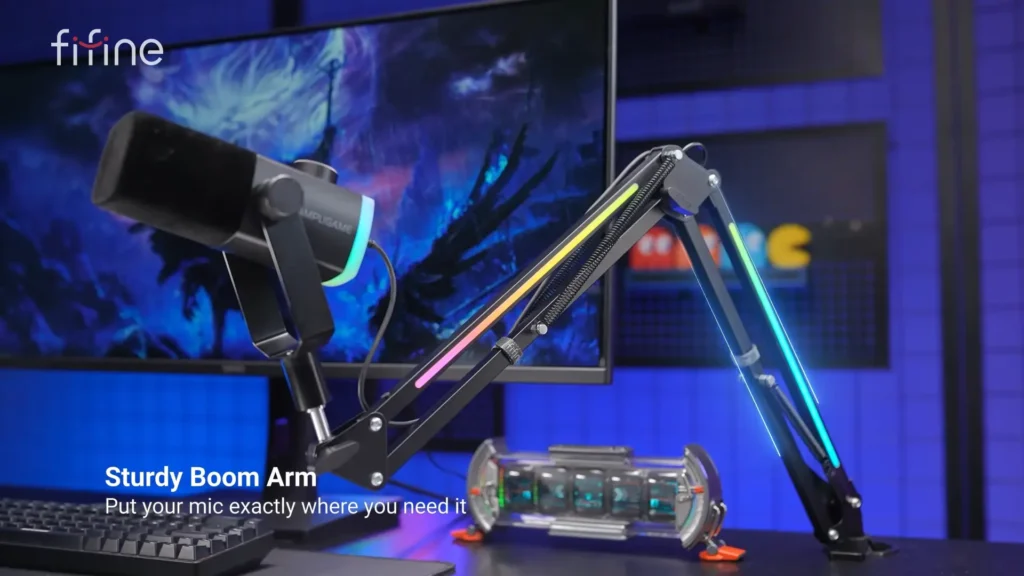
The bundled boom arm holds the microphone securely and looks fantastic with its built-in RGB strips. However, spring boom arms inherently carry some drawbacks:
- Vibration transmission: If you bump the arm or your desk, those vibrations can translate into your audio
- Spring noise: Movement can produce audible creaking
- Non-replaceable RGB cable: The USB cable powering the RGB is built into the arm, making replacement difficult if it fails
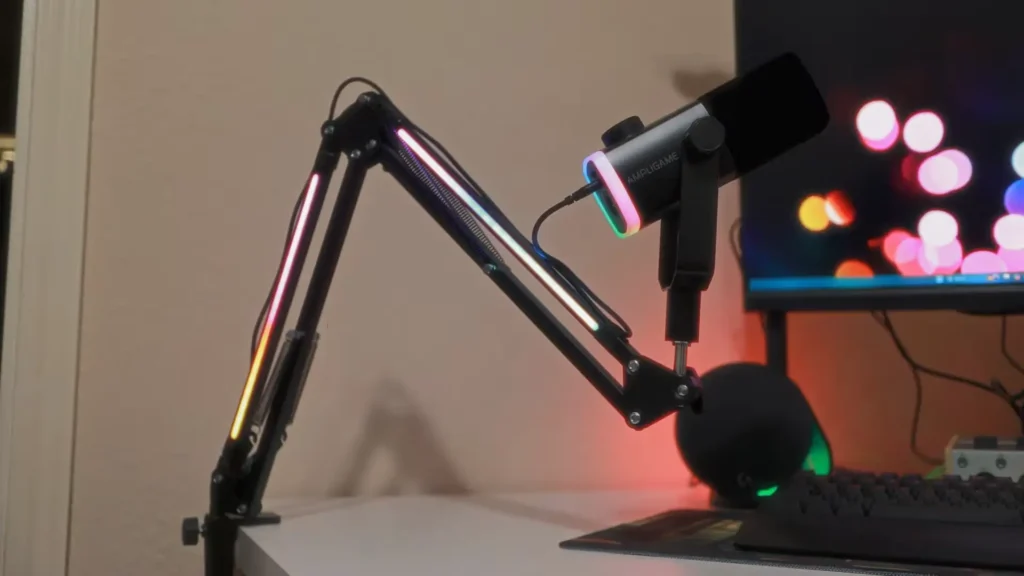
Multiple reviewers noted they’d prefer FIFINE’s internal cable management boom arms (like the BM88 or BM66T) with this RGB treatment added. The spring design works, but it’s not ideal for creators who frequently reposition their microphone.
One missing feature that would cost almost nothing to implement: cable management clips. There’s no built-in solution for routing your XLR or USB cable along the boom arm, leaving cables dangling free.
FIFINE AM8PROT Features & Controls
Score: 9/10
This is where the “Pro” in AM8PROT earns its name. FIFINE has loaded this microphone with thoughtful features that genuinely improve the streaming and recording experience.
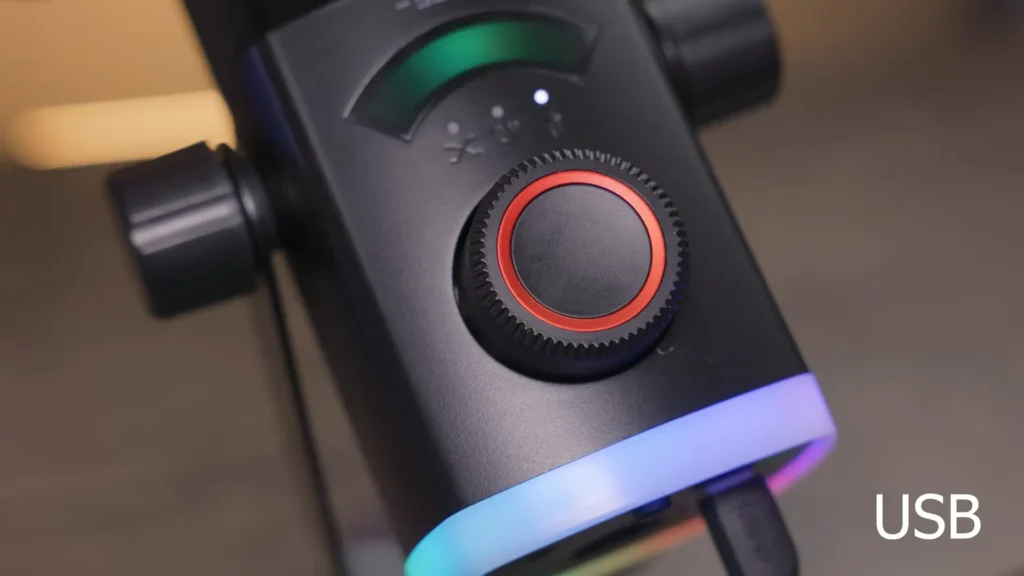
Multi-Function Gain Knob
The prominent knob on top serves multiple purposes:
- Mic Gain Control – Adjust your input level in real-time
- Headphone Volume – Control your monitoring mix
- PC/Balance Mix – Similar to Xbox headphones, balance audio between different sources (like game audio vs. chat)
Press the knob to cycle between modes, and the LED ring displays your current level with a circular indicator. You actually know where your settings are without diving into software.
Touch-to-Mute
The top portion of the FIFINE AM8PROT mics features touch-sensitive mute functionality. Tap it, and the LED ring turns red to indicate muted status. It’s responsive—almost too responsive, as some reviewers noted accidentally muting during handling.
When you’re live, the visual feedback is immediately clear. No more wondering if you’re muted or accidentally talking to dead air.
Real-Time Monitoring
The 3.5mm headphone jack on the back enables zero-latency monitoring of your voice. For streamers and podcasters, this means you can hear exactly what your audience hears without audio delay.
Connectivity Layout
The back panel houses:
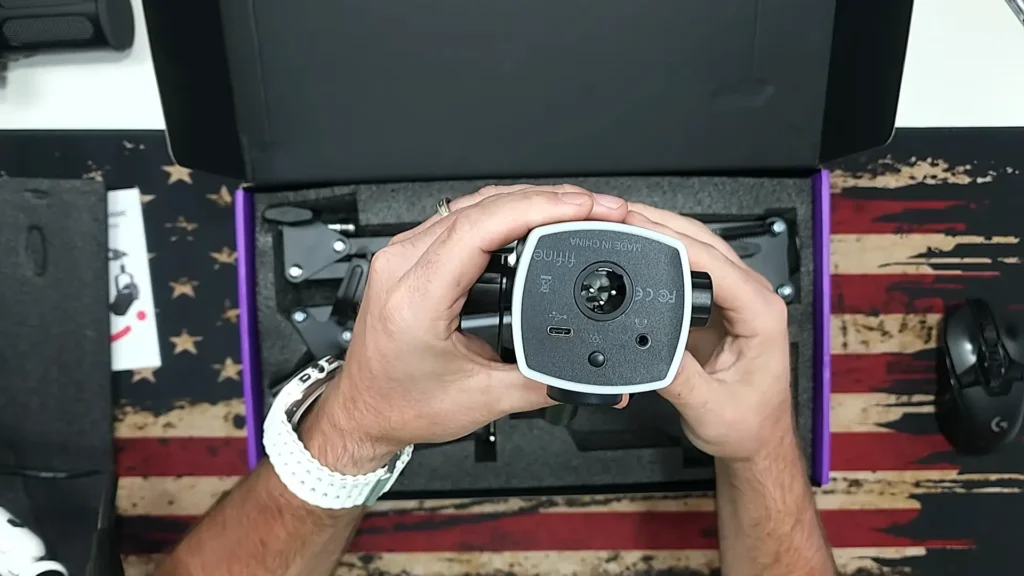
- USB-C port – For digital connection and power
- XLR output – For audio interface/mixer connection
- 3.5mm headphone jack – For monitoring
- RGB control button – Cycle through lighting modes
One clever capability: you can run USB (for RGB and display functionality) while outputting audio through XLR. This lets you maintain the visual feedback and lighting while still leveraging your audio interface for better sound processing.
FIFINE AM8PROT RGB & Aesthetics Review
Score: 9/10
Let’s be honest—if RGB isn’t your thing, the AM8PROT might feel like overkill. But for creators who want their setup to look as good as it sounds, FIFINE went all-in.
The LED ring around the microphone capsule and the boom arm responds to your voice in real-time. When you speak, it illuminates, creating a visual representation of your audio input. Multiple color modes and effects are available:
- Static single colors
- Rainbow flowing
- Multi-color gradients
- Multi-color breathing
- Ring flowing
Press and hold the RGB button to turn the lights off entirely if you prefer a cleaner look. But the RGB is positioned toward the back and sides of the AM8PROT. One reviewer noted you’d need a specific angle to show off the full RGB effect. Anyway, for desk aesthetics and in-person appearance, the RGB delivers.
AM8PROT Using Experience
Score: 8/10
Setup Experience
The AM8PROT follows FIFINE’s tradition of plug-and-play simplicity. Connect the USB cable to your computer, and you’re live. Windows and Mac recognize the microphone without driver installation.
For XLR users, connect to your audio interface and you’re ready to record. No phantom power required—dynamic microphones work with passive connections.
Learning Curve
The multi-function knob takes a few minutes to understand. Click to cycle through modes, turn to adjust levels. The LED display provides instant feedback, but first-time users should spend some time getting familiar with the three modes before going live.
Software Compatibility
The FIFINE AM8PROT works natively with all major streaming and recording software: OBS, Streamlabs, Discord, Audacity, and more. No proprietary software required.
For advanced users wanting to improve USB audio quality without an XLR interface, several reviewers recommended using Elgato’s Wave Link 3.0 (free software) with VST plugins for EQ and noise removal. This combination lets you achieve near-XLR quality processing on the USB connection.
Who Is FIFINE AM8PROT For?
| User Type | Recommendation |
| First-time streamers | ✅ Highly recommended – complete kit gets you started immediately |
| Budget-conscious podcasters | ✅ Recommended – solid audio quality at accessible price |
| Gamers wanting better voice chat | ✅ Recommended – noise cancellation handles background noise well |
| RGB enthusiasts | ✅ Highly recommended – full lighting customization on mic and arm |
| Current AM8 owners | ⚠️ Skip – upgrade to Tank series for meaningful improvement |
| Professional voice actors | ⚠️ Consider alternatives – good for the price, but higher-end options exist |
| Mobile/active streamers | ⚠️ Caution – directional pickup requires consistent positioning |
FIFINE AM8PROT Alternatives
1. FIFINE Tank 6
Score: 9/10
| Pros | Cons |
| Superior audio quality | Higher price (~$100+) |
| Professional appearance | No included boom arm |
| Minimal EQ required | No XLR cable included |
| Premium build quality | Less RGB customization |
Best for: Creators ready to invest more for noticeably better audio quality. Multiple reviewers named the Tank 6 as their top FIFINE recommendation alongside the AM8PORT.
2. FIFINE AM8 (Original)
Score: 7.5/10
| Pros | Cons |
| Lower price point | Older design |
| Proven reliability | No LED display |
| Solid audio quality | Fewer features |
| Same dual connectivity | Less intuitive controls |
Best for: Budget buyers who don’t need RGB or the latest features. If you find the original AM8 on sale, it remains a capable choice.
3. FIFINE SC8 + AM8PROT Combo
Several reviewers specifically called out the FIFINE SC8 audio interface as an ideal pairing with the AM8 Pro T for XLR users. The combination runs around $130-140 total and delivers a semi-professional setup at budget pricing.
Final Thoughts
The AM8PROT delivers exactly what budget-conscious creators need: a complete streaming setup that sounds good, looks great, and won’t require a second mortgage. It’s not perfect—the wobbly gain knob and spring boom arm are legitimate criticisms—but these feel like nitpicks against the overall value proposition.
If you already own the AM8, I’d skip the upgrade. The changes are nice, not necessary. But if you’re buying your first real mic or upgrading from a headset, the AM8PORT is an easy yes. FIFINE keeps proving you don’t need a huge budget to sound good.
FAQs
Can I use the AM8PORT without the included boom arm?
Yes. The microphone uses a standard 5/8″ thread mount compatible with most boom arms and microphone stands. You can use the mic with any standard mounting solution.
Do I need an audio interface to use XLR mode?
Yes. XLR output requires an audio interface, mixer, or external recorder. The XLR connection is passive—no phantom power needed since this is a dynamic microphone.
Does the RGB affect audio quality?
No. The RGB lighting operates independently from the audio circuitry. You can turn RGB off entirely if preferred without impacting sound quality.
Is an XLR cable included?
No. If you plan to use XLR mode, you’ll need to purchase an XLR cable separately. Budget approximately $10-15 for a quality cable.
Can I adjust the RGB colors through software?
No. RGB control is handled through the physical buttons on the microphone and boom arm. There’s no software configuration available.
How sensitive is the AM8PORT to keyboard and mouse noise?
The cardioid pattern helps reject off-axis noise, but as a dynamic microphone, it can pick up handling vibrations transmitted through the boom arm. Position the mic away from your keyboard and avoid bumping the arm during recording for best results.
