

Best Microphones for Podcasting: 6 Top Picks Compared

A good microphone can help your podcast take it to the next level, but picking a podcast microphone can feel overwhelming. For this guide, we evaluated each mic on sound quality, build quality, design, connectivity options, included accessories, and real performance against expert recommendations. From the FIFINE K668 to the Elgato Wave DX, the best microphones for podcast are depends on you.
How They Work: The Best Microphones for Podcast
1. FIFINE K688 — Best Overall Value
Score: 9.0/10
| Criteria | Score |
| Sound Quality | 8.5/10 |
| Build Quality | 8.0/10 |
| Value for Money | 9.5/10 |
| Connectivity | 9.5/10 |
| Ease of Use | 9.0/10 |
Pros:
- Dual USB/XLR output gives you the flexibility to grow your setup
- Priced at ~$75 — one of the best value propositions in podcasting
- Consistently strong sales numbers speak to proven reliability
- Clean, functional sound right out of the box
Cons:
- Sound quality benefits from some post-processing or EQ tweaking
- Build quality, while good for the price, doesn’t quite match premium competitors
- No companion software for fine-tuning audio settings
The FIFINE K688 hits a sweet spot that’s hard to argue with: dual USB and XLR connectivity at $70, with sound quality that punches well above its weight class.
In our side-by-side sound tests, the K688 held its own against every sub-$100 competitor. The dual connectivity is the killer feature — plug straight into your computer via USB for solo recording, or run it through an XLR interface like the Focusrite Vocaster 2 when you’re ready for a multi-mic setup.
The build doesn’t feel cheap either. It’s not as heavy as the Røde PodMic, but it’s solid enough for daily use. If you want one mic that works whether you’re running a simple USB setup today or plan to move to an XLR interface later, this is the one.

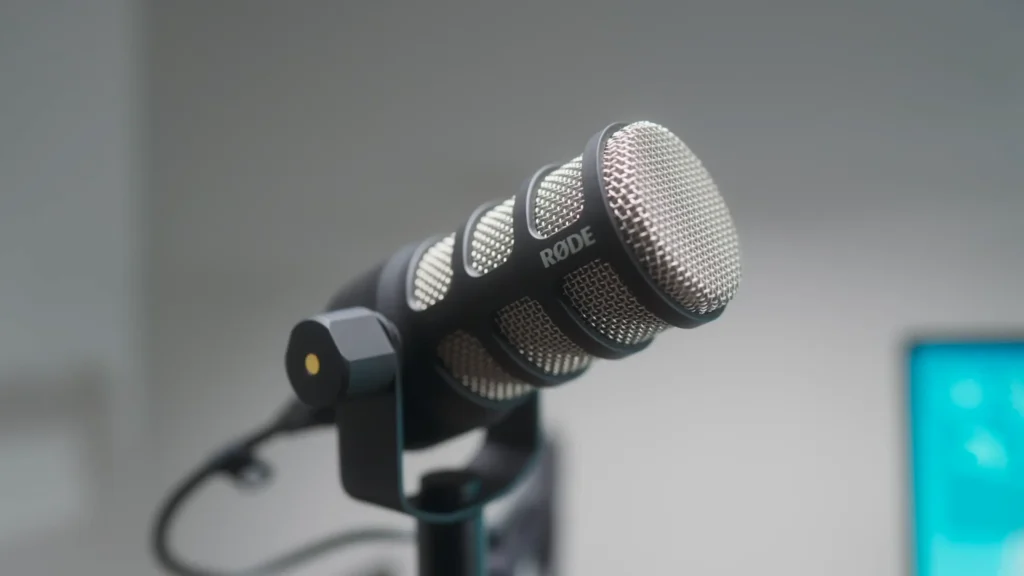
2. Røde PodMic — Best XLR-Only Option
Score: 8.8/10
| Criteria | Score |
| Sound Quality | 9.5/10 |
| Build Quality | 9.5/10 |
| Value for Money | 8.5/10 |
| Connectivity | 7.0/10 |
| Ease of Use | 8.0/10 |
Pros:
- Best sound quality in the sub-$100 XLR category — fuller and better balanced
- Rock-solid metal construction
- Looks great on camera (you’ll see it in countless YouTube podcast setups)
- Proven track record as the most popular XLR podcast mic under $100 on Amazon
Cons:
- XLR only — requires an audio interface (no USB option)
- At $99, it’s at the top of the budget range
- No built-in headphone monitoring
If you already own an audio interface (or plan to buy one) and want the best-sounding XLR mic under $100, the Røde PodMic is the clear winner.
In our sound tests, the PodMic produced the fullest, most balanced audio of any mic under $100. Low-end warmth and mid-range clarity make voices sound polished without heavy post-production. It is also built for durability that could survive a fall off your desk without flinching.
The trade-off: you’re locked into XLR. You’ll need an audio interface — something like the Focusrite Vocaster 2 ($99) handles it with ease at up to 70 dB of gain.
3. Maono PD300X — Best Budget Mic With Software
Score: 8.7/10
| Criteria | Score |
| Sound Quality | 9.0/10 |
| Build Quality | 8.5/10 |
| Value for Money | 8.5/10 |
| Connectivity | 9.5/10 |
| Ease of Use | 8.0/10 |
Pros:
- Companion software with podcasting presets dramatically improves sound
- Dual USB/XLR connectivity
- Heavier and better-built than the FIFINE K688
- Clean, modern design
Cons:
- Relies on software tweaking to reach its full potential
- Slightly newer to market with a smaller user base
- Priced just under $100
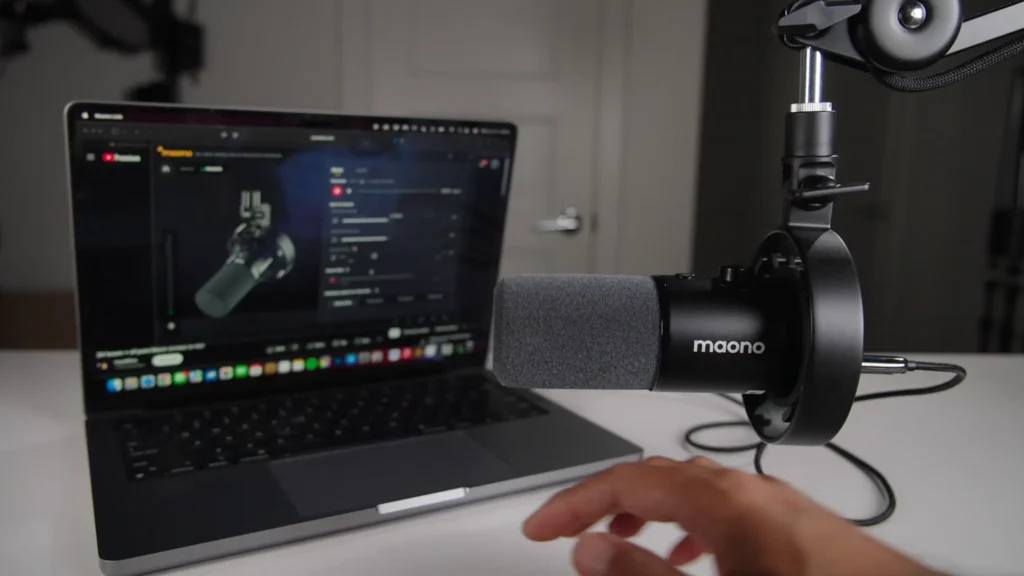
The Maono PD300X is a relatively new arrival that punches above its weight, thanks largely to its companion software.
On paper, the PD300X looks similar to the FIFINE K688 — both offer USB and XLR under $100. But the Maono edges ahead in build quality (noticeably heavier) and software-enhanced sound.
Selecting the podcasting preset in the companion app tightens up the audio, drops background noise, and adds vocal presence. With a few tweaks in the app — even just selecting the built-in podcasting preset — the PD300X sounds noticeably better than competitors at the same price point.
4. Samson Q2U — Best Starter Mic
Score: 8.5/10
| Criteria | Score |
| Sound Quality | 8.0/10 |
| Build Quality | 8.0/10 |
| Value for Money | 9.0/10 |
| Connectivity | 9.5/10 |
| Ease of Use | 9.5/10 |
Pros:
- Comes with everything you need: stand, USB cable, XLR cable
- Recommended by Buzzsprout and Transistor experts
- Works with computers and mobile devices
- The dynamic mic rejects room noise well
Cons:
- Desktop stand positions the mic far from your mouth (consider a boom arm)
- Sound quality is good, but not as refined as the Røde PodMic
- Design is functional rather than eye-catching
The Samson Q2U replaced the discontinued Audio-Technica ATR2100X as the default budget pick, and it earns that spot by including everything a beginner needs in the box. Both Alvin Brook of Buzzprout and Justin Jackson of Transistor recommend this microphone.
It ships with a desktop stand, USB cable, XLR cable, and a windscreen. Plug it in, hit record, and you’re podcasting. It’s that simple. As a dynamic microphone, it rejects background noise well — handy for untreated spaces.
One tip: invest in a boom arm. Also, a windscreen can effectively reduce plosive sounds. Most microphones sound dramatically better at a fist-length distance rather than sitting on a desk stand.

5. FIFINE AM8 — Best Ultra-Budget Pick
Score: 8.3/10
| Criteria | Score |
| Sound Quality | 7.5/10 |
| Build Quality | 7.5/10 |
| Value for Money | 9.5/10 |
| Connectivity | 9.5/10 |
| Ease of Use | 9.0/10 |
Pros:
- Just $57 with a boom arm included
- XLR and USB-C dual output
- Tested favorably against a $500 Shure SM7dB in casual listening tests
- Built-in LED ring light, physical dials, and mute switch (in USB mode)
Cons:
- USB-specific features (LED, dials) don’t function in XLR mode
- Sound quality, while impressive for the price, trails the K688 and PodMic
- The build feels lighter than other options in this roundup
At $57, the FIFINE AM8 is the cheapest mic on this list — and it comes with a boom arm included. But in real-world testing, it held up surprisingly well. If your budget is tight and you need to start recording now, the AM8 removes every barrier to entry.
When tested against a $500 Shure SM7dB during Zoom calls, nobody could tell the difference. They’re not sonically identical in a controlled setting, but it speaks to how far budget mics have come.
The included boom arm (typically $20–$40 separately) means FIFINE is giving you a complete recording setup for the price of most standalone mics. Grab a pair of AM8s and a Vocaster 2, and you’re recording a two-person show for under $215.
Tips: Like K688, FIFINE AM8 supports USB and XLR connections. But the XLR cable isn’t included. You had better prepare an extra XLR cable for an updated setup.

6. Elgato Wave DX — Best Compact Design
Score: 7.8/10
| Criteria | Score |
| Sound Quality | 7.5/10 |
| Build Quality | 8.0/10 |
| Value for Money | 7.5/10 |
| Connectivity | 7.0/10 |
| Ease of Use | 8.5/10 |
Pros:
- Clean, compact metal design
- Solid build quality at the $70 price point
- Lightweight and easy to position
- Pairs seamlessly with Elgato’s Wave Link software
Cons:
- XLR only — no USB option
- Sound quality is good, but not as full as the Røde PodMic or Maono PD300X
- Fewer features compared to similarly priced dual-connectivity mics
- Doesn’t stand out sonically in a crowded field
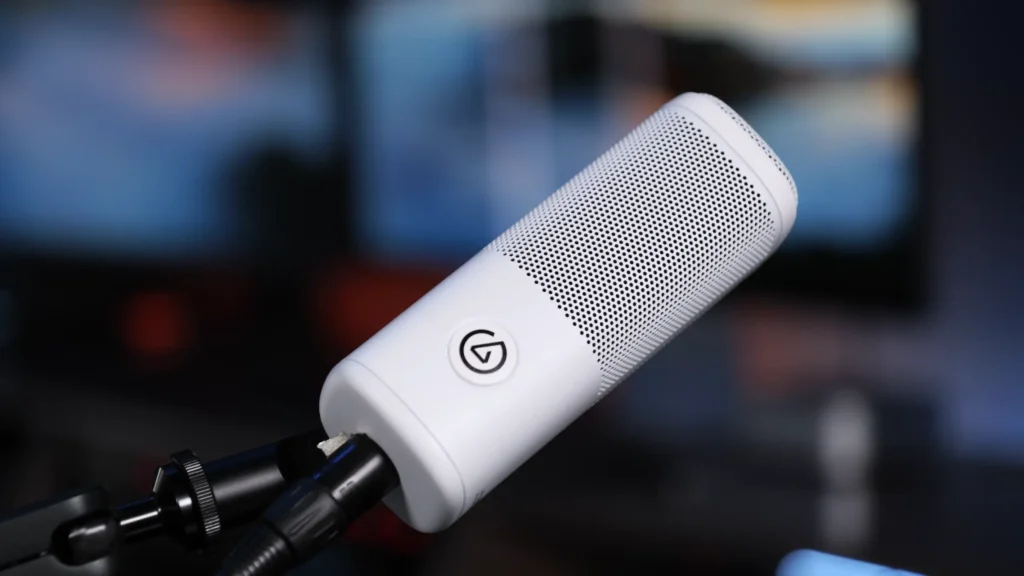
The Elgato Wave DX is one of the cleanest-looking budget mics on the market. Mike Hurley, one of the co-founders of the podcast Relay, praises its simplicity and easy use. At $70, it offers a solid metal build in a compact form factor that won’t dominate your desk.
The Wave DX delivers exactly what Elgato does well: clean design and tight ecosystem integration. If you already use an Elgato Stream Deck, Key Light, or other Elgato gear, the Wave DX slots right in. Sound-wise, it’s perfectly serviceable for podcasting — clear and detailed.
But in our side-by-side tests, it lacked the fuller, more balanced low end you get from the Røde PodMic or even the software-enhanced Maono PD300X. At the same $70 price, the FIFINE K688 offers dual connectivity that the Wave DX can’t match.
How They Compare: Picking the Right Mic for You
Here’s a quick-reference comparison of these six microphones for podcast, followed by our take on who each mic is actually built for.
| Microphone | Price | Connection | Best For | Ideal For |
| FIFINE K688 | ~$70 | USB + XLR | Best Overall Value | Most podcasters |
| Røde PodMic | ~$99 | XLR only | Best XLR-Only Option | Sound-first XLR users |
| Maono PD300X | ~$99 | USB + XLR | Best Budget Mic With Software | Software tweakers |
| Samson Q2U | ~$70 | USB + XLR | Best Starter Mic | Day-one beginners |
| FIFINE AM8 | ~$57 | USB-C + XLR | Best Ultra-Budget Pick | Tight budgets |
| Elgato Wave DX | ~$70 | XLR only | Best Compact Design | Elgato ecosystem users |
How to Pick: Buying Guide for a Podcast Microphone
Connection Type: USB vs. XLR vs. Both
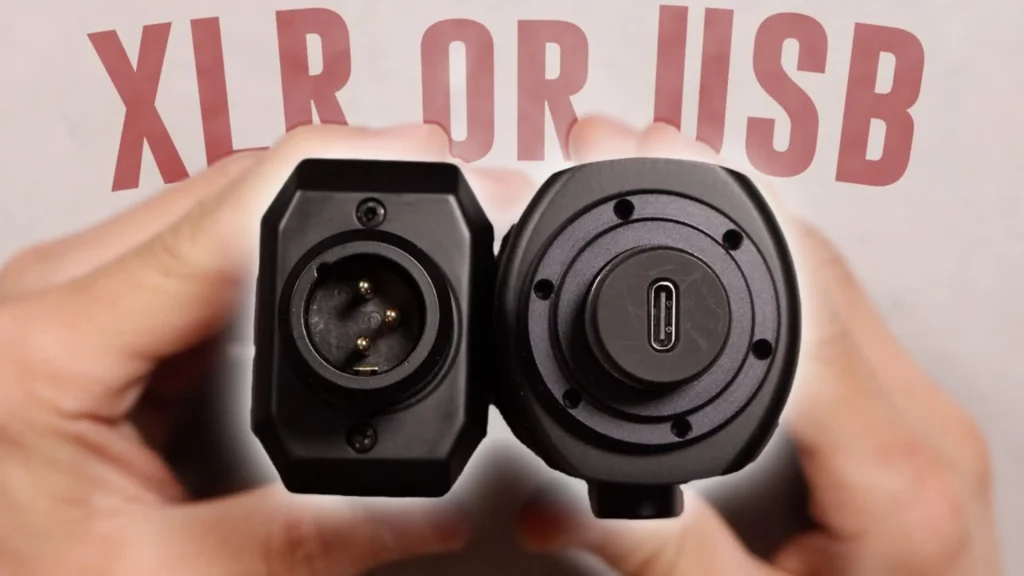
This is your first and most important decision to start a podcast. USB microphones plug directly into your computer — no extra gear needed. XLR microphones require an audio interface but allow multi-mic setups and finer control. Dual USB/XLR mics (like the FIFINE K688 and AM8) let you start simple with USB and graduate to XLR later.
Recording solo? USB works. Planning for in-studio guests? Prioritize XLR or dual-connectivity mics.
Sound Quality
All six mics on this list sound good. The differences show up in low-end warmth, mid-range clarity, and plosive handling. Dynamic microphones reject room noise better, making them ideal for untreated spaces. Condenser mics capture more detail but pick up more background sound. For podcasting, dynamic mics are usually the safer bet.
Build Quality
You’ll be adjusting and repositioning your mic regularly. Metal construction (like the Røde PodMic) handles this better. Heavier mics also produce less handling noise.
Included Accessories
What’s in the box matters, especially on a budget. The Samson Q2U includes a stand, cables, and a windscreen. The FIFINE AM8 comes with a boom arm. These inclusions can save you $20–$50 in additional purchases.
Software and Customization
Some mics, like the Maono PD300X, come with companion software that lets you tweak EQ, add presets, and fine-tune your sound without third-party tools. If you’d rather not learn audio editing software right away, a mic with built-in sound processing can be a real advantage.
Price and Value
Every mic on this list costs under $100. The sweet spot for most podcasters is $57–$99. Spending more doesn’t always mean better results — it often just means more features or connectivity options you may not need yet.
Final Words on the Best Microphones for Podcast
For most podcasters, the FIFINE K688 offers the best combination of sound, connectivity, and value. If you’re committed to XLR and want the richest sound under $100, go with the Røde PodMic. For software-driven optimization, the Maono PD300X delivers. Total beginners should grab the Samson Q2U for its everything-in-the-box simplicity. Want every dollar counts? The FIFINE AM8 at $57 with a boom arm is hard to beat. And if you’re already in the Elgato ecosystem, the Wave DX integrates seamlessly with your existing gear.
No matter which mic you pick, you’re getting quality that would have cost two or three times as much just a few years ago.
Q&A
Do I need an audio interface to start podcasting?
Not if you choose a USB or dual USB/XLR mic. The FIFINE K688, Samson Q2U, and FIFINE AM8 all plug directly into your computer. An interface becomes necessary for multi-mic XLR setups.
What’s the difference between a dynamic and a condenser microphone?
Dynamic mics reject background noise better — ideal for untreated rooms. Condensers capture more detail but also more ambient sound. For podcasting, dynamic is usually the practical choice.
Can I use these microphones for video podcasting?
Yes. All six work for audio-only and video setups. The Røde PodMic and FIFINE AM8 look particularly good on camera.
What free software can I use to record my podcast?
GarageBand (macOS) and Audacity (Mac, Windows, Linux) are the most popular free options. Both support multi-track recording with an audio interface.
How close should I be to my podcast microphone?
About a fist-length — roughly 3 to 4 inches. This gives the best balance of warmth and clarity while minimizing room noise.
